I recently spent six days out in Central Pennsylvania on house- & puppy sitting duty again. I got to spend some quality time with my grand-dog, Belle, and got in some radio time, too.
Grand-dog, Belle
PA State Game Land 246 (US-8941, KFF-5862)
My first radio outing was early on a Friday morning. Pennsylvania State Game Lands 246 is only about 10 minutes away, so it’s perfect for a quick activation. With an active geomagnetic field, the propagation didn’t look at all promising. I ignored all that and headed out the door. As I was leaving, Belle thought we were going for another walk. Needless to say, I had a very disappointed German shepherd at the window watching me leave.
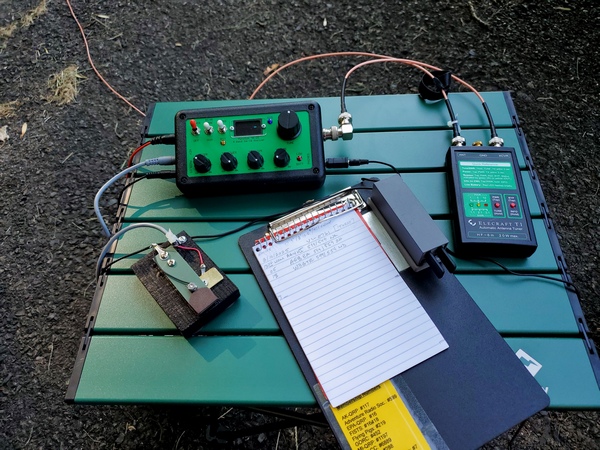
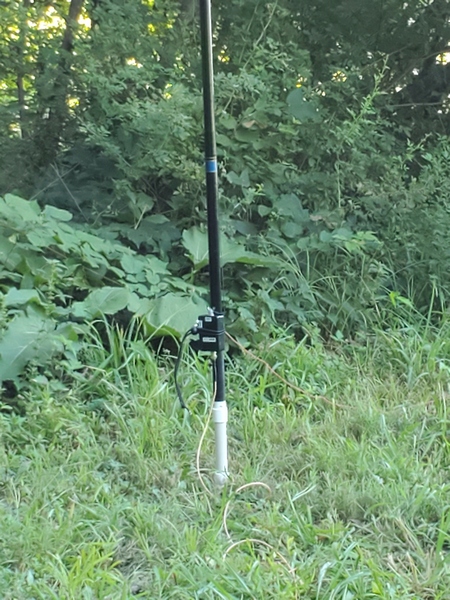
The parking lot at SGL246 was empty when I got there. I set up my 12-foot whip and homebrew loading coil, along with my trusty Penntek TR-35 (5 watts, CW). I spent the whole activation—and it was a short one—on 40M.
State Game Lands 246 (US-8941, KFF-5862)
Given the band conditions and the early hour (around 0745 local) on a weekday, I got off to a slow start. My big issue was the local power line noise. Before I started, I tuned around 40M to find a frequency where the noise was lower. Despite the band conditions and noise, I seemed to be getting out well enough, and the received signals were fairly strong.
After 30 minutes on the air, I finished up with 14 contacts. I packed up my gear and headed back to take Belle for that walk. After that, I think she forgave me for leaving without her.
And Then the Rains Came
Bright and early Saturday morning, I took Belle through the basement to let her out in the backyard. I found myself splashing through puddles of water in the rec room, and the sump pump was running like crazy.
We had some severe thunderstorms the previous night, and according to the local news, we received close to two inches of rain overnight. So, much of the day was spent cleaning up and drying out instead of playing radio. Fortunately, my (far) better half drove out for the weekend and helped with the cleanup effort.
Capt. John Smith Chesapeake National Historic Trail (US-4567)
When I woke up Sunday morning, I saw we were in the midst of a severe geomagnetic storm. Some hams on a local repeater were complaining about the poor conditions on the HF bands. So, what did I do? I headed out for an early morning QRP POTA activation.
For this water trail, I went to a public boat launch on the Susquehanna River. The river was still slightly flooded from the recent rainstorms, but the water hadn’t reached the parking lot.
Some minor flooding on the Susquehanna River
Given the poor band conditions, I used my homebrew loading coil and a 17-foot whip instead of my usual 12-foot whip. I was hoping the additional five feet would help my 5 watt signal punch through the geomagnetic storm.
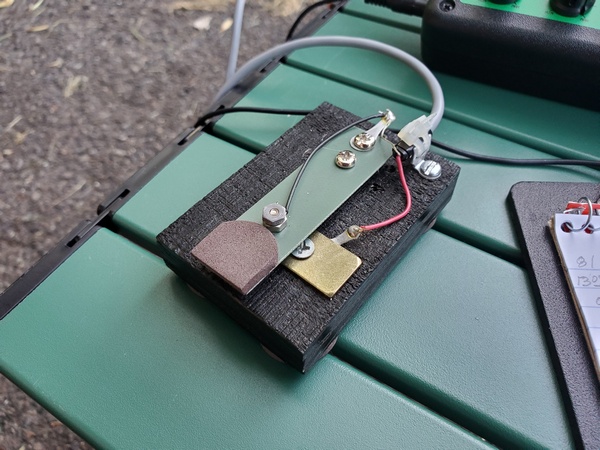
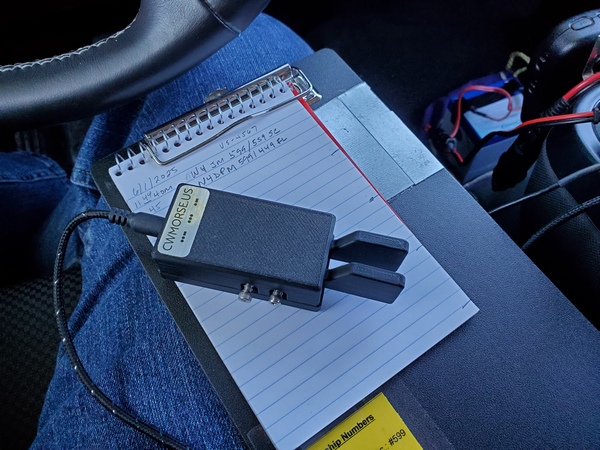
I also used my brand new Pocket Paddles from CWMorse. I neglected to order one with magnets, so I couldn’t attach it to my clipboard. However, I think I have a plan to address that as a future project. On the air, the Pocket Paddles performed flawlessly, and I’m looking forward to using them a lot more in the future.
CWMorse Pocket Paddles
After my third CQ call on 40M, I quickly logged my first two contacts. The contacts kept coming, but at a slow pace. After nine contacts, I thought that the tenth one might never come. Fortunately, it did. After 45 minutes, I ended up with 12 contacts, including one park-to-park. Not bad for a severe geomagnetic storm. I packed up and headed to a grocery store to pick up a few things for breakfast back at the house.
And Back to PA SGL246
On Monday morning I made another trip over to PA State Game Lands 246. There was a major geomagnetic storm in progress, so I knew this would be another challenging activation.
The parking lot was empty the whole time I was there. No big surprise, given that it was early on a weekday. I went with the same set-up as yesterday, opting for the 17-ft whip.
With a K Index of six and the usual power line noise, it was slow going on 40M. It took a few minutes of continuous CQing to log my first contact. It took almost 45 minutes to get seven in the log. At that point, things stalled for a bit. Around that time, I received a NOAA email alert saying the K Index had increased to seven.
I had allotted an hour for this activation, and I was getting close to the end. Then, out of nowhere, I had three callers in rapid succession that got me to 10 contacts. For good measure, there were three more after that.
I finished up with 13 in the log, with one known park-to-park contact. So, my little five-watt station managed to pull it off again. Take that, Mr. Sun!
And with that, I wrapped up my activations out here. Radio-wise, the band conditions were challenging, but it was still fun. I might be back in central Pennsylvania for another round of puppy sitting next month—with better band conditions, I hope!
I needed another mini straight key like a hole in the head. With my fascination for these things, however, I just couldn’t help myself.
The key in question came from AliExpress and cost me about $18 USD. Although it has no markings on it, it appears to be from the same manufacturer as the QU-21C paddles I bought a while back. The basic design is the same as the QU-21C, and it came with identical packaging and accessories. After modifying the magnetic base, the paddles have served me well. So I took a chance on the look-alike straight key.
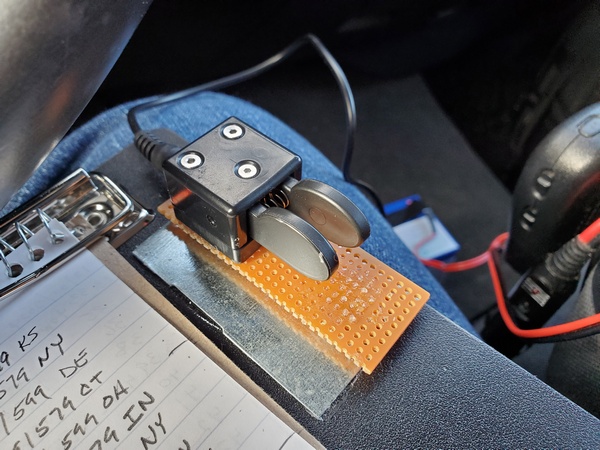
My no-name mini straight key from AliExpress during a recent portable outing. The key is magnetically attached to steel strips I glued to my clipboard.
Out of the box, the straight key’s contact spacing was a little wide for my taste. Using the included Allen wrench, I adjusted the key more to my liking. For a cheap key, it has a pretty good feel to it, and it keys cleanly.
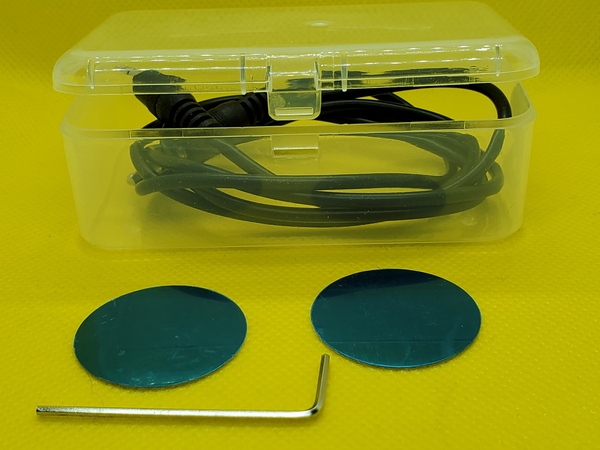
The accessories that came with the mini straight key. (Not shown is an adhesive rubber square that I attached to the bottom of the key.)
Based on my experience with the QU-21C paddles, I had some reservations about the highly polished square magnet on the bottom. However, since the motion of the straight key is the vertical plane instead of side-to-side, the magnet is less of an issue.
I used the key during a recent outing, and I had no major issues with it. I have some a couple of steel strips glued to my clipboard, and I stuck the key there. There was a little movement, but nowhere near as bad as the paddles. I just needed to make sure I didn’t get too vigorous with my keying. After I use them some more, I’ll decide if I want to modify them like I did with the paddles.
Most of the time I get what I pay for, but in this case, I think I got a decent product for the price. I let you know if my opinion changes with time.
I was out in central Pennsylvania over the past weekend for our family’s belated Thanksgiving get-together. Before we left for home on Sunday, I squeezed in a quick early-morning POTA activation. This time, I drove down to Falmouth Boat Launch to activate the Captain John Smith Chesapeake National Historic Trail (US-4567).
The Falmouth launch is about two miles downstream from the infamous Three Mile Island Nuclear Generating Station. I was here once before back in 2018. However, I had forgotten that this water trail includes the entire length of the Susquehanna River. (I have since uploaded that log to the POTA website.)
Susquehanna River
It was about 20F (-7C) when I headed out for the 15-minute drive to the site. The parking lot was nearly empty, so I was able to park in a spot that fell within the 100 feet guideline. I had previously used Google Earth to measure the distance to the river.
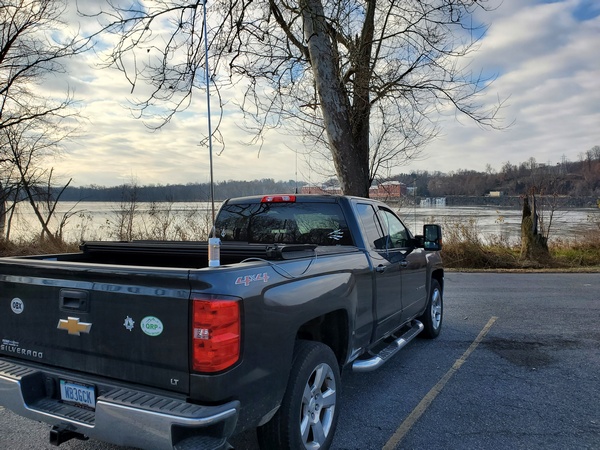
WB3GCK along the Susquehanna River on a sub-freezing morning
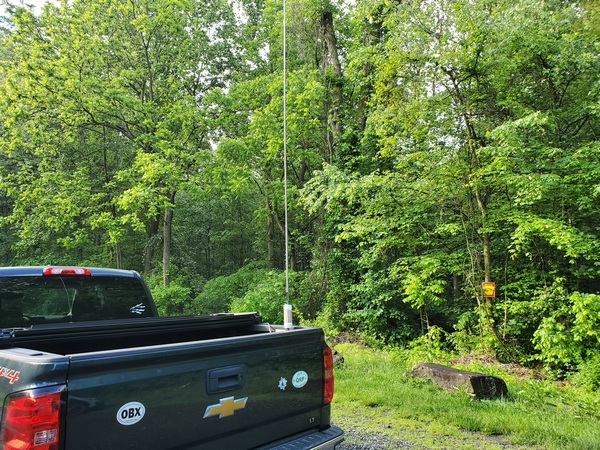
I quickly put up my 12-foot loaded whip (before my fingers got numb) and set up my Penntek TR-35 (5 watts CW). Thankfully, the sun and my body heat brought the cab of the truck up to 40F (4C) in short order.
The conditions on 40M were amazing. The first two stations answered my CQs before I had even spotted myself. When I finally posted my spot, I had a huge pile-up. There were a lot of early risers out there, so Craig was a very busy boy for the first 15 minutes or so.
I gave the cheap QU-21C paddles a real workout this morning. My quick and dirty magnetic mount held perfectly, and the paddles worked great. They’ll be seeing a lot more use in the future.
QU-21C Mini Paddles with my quick & dirty magnetic mount. This clipboard has some thin, steel strips, instead of the steel washers I had been using.
After 33 minutes on the air, I had worked 32 stations, all of them on 40M. I had one known park-to-park.
Then, it was time to head back to my daughter’s house for breakfast. On the way, I pulled over to take some pictures of Three Mile Island. I also saw another boat launch that I’ll have to check out further.
When I bought the QU-21C Mini Paddles a while back, I wasn’t crazy about the small square magnet attached to the base. It didn’t seem to hold very well. When subjected to vigorous keying, the paddles would sometimes move side-to-side. I came up with a quick and dirty hack that resolved the issue for me.
A little backstory is in order. I’ve never been a big fan of “two-handed” keying; that is, holding the paddles in one hand while sending with the other. I modified a small clipboard by gluing two steel washers to it, such that they lined up with the two magnets in my Palm Mini paddles. The clipboard securely holds the paddles and gives me a nice writing surface for logging in the field. I’ve been using clipboards like this for about 10 years now.
In just a few minutes, I modified my QU-21C paddles to adapt them to my clipboards and make them more suitable for “single-handed” keying. The first order of business was to remove the square magnet from the bottom of the paddles. That was almost too easy. I wedged a knife blade between the base and the magnet, and the magnet popped right off.
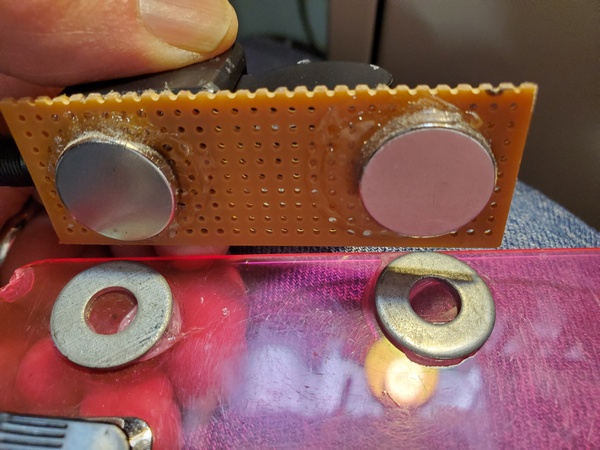
Magnets glued to the underside of the perf board to line up with the steel washers on my clipboard
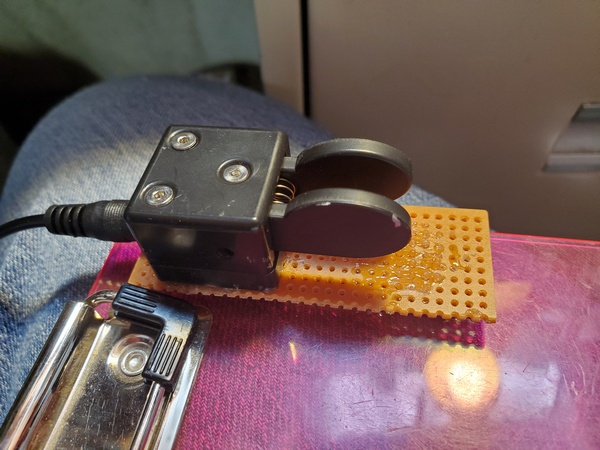
Next, I took some perf board from my junk box and cut off a 3.5 x 1 inch piece. I used some Goop® adhesive to attach two magnets on one side of the board. I placed them so they had the same spacing as the magnets on my Palm paddles. Then I glued the QU-21C paddles to the other side of the perf board. Except for the drying time for the adhesive, I completed the project in about 10 minutes.
The QU-21 paddles glued to the perf board and ready for use
The magnets I used are really strong and probably overkill for this application. But, I had a bunch of them on hand, so I put them to use.
Admittedly, this cheesy little hack doesn’t look like much. If I feel ambitious sometime, I might come up with something more elaborate. Maybe something like the base I made for my little MS2 straight key. For now, though, this will suffice.
I’ve been toying with the idea of putting together a small radio kit based on my (tr)SDX or something similar, so I’ve been looking at small paddles to go with it. Browsing through eBay recently, I came across several listings for the QU-21C paddles. They were inexpensive, so I thought I’d order them and give them a shot.
These paddles are nothing new; they’ve been around for a few years. (I’m definitely no early adopter.) The QU-21C paddles are made in China and mine are marked with the brand name, Magic Rabbit. From other reviews I have seen, there may be other manufacturers. So, the quality and packaging may vary. I paid about $24 USD from a seller (iDrone) that ships from the U.S., but you can find them listed for less than $20, if you don’t mind waiting for a shipment from China.
Opening the package, I found the paddles are even smaller than I expected. The base is approximately .98 inch by .98 inch (25mm x 25mm) and 1 inch (26mm) tall. The overall length, including the paddles, is 1.9 inches (48.5mm). On my kitchen scale, the paddles weighed in at 1.25 ounces (34 grams). The paddles appear to be 3-D printed, but the quality is pretty good. The base of the paddles is magnetic, which is one feature that first drew my attention.
Magic Rabbit QU-21C paddles with the rubber pad attached to the magnet. The pad looks a little ragged around the edges, because I applied it, removed it, and then decided to put it back on. I messed it up a little in the process.
The package I received included:
Paddles with a magnet attached to the bottom
3-ft cable with 3.5mm stereo plugs on each end
Hex wrench for adjusting contact spacing
Two adhesive metal discs
Adhesive rubber pad
Plastic storage case that holds everything
Some of the accessories that came with it. The cable is inside the clear plastic storage box. The adhesive discs can be applied anywhere, so you can use the attach the paddles magnetically.
My first impression was that the contact spacing seemed a little wider than I like. I used the supplied hex wrench and adjusted the spacing until the contacts were completely closed. Then, I backed off a little.
I prefer a light spring tension on my paddles, but the spring in these paddles seems stiffer than I’m used to. Unfortunately, there’s no adjustment for that. So, I’ll just have to get used to using a little more force than my other paddles.
I’m not sold on the magnetic base, though. The square magnet is fairly strong, but it’s highly polished. So, the paddles sometimes have a tendency to slide when I’m sending. I applied the rubber pad that comes with it, but that seemed to offer only minimal improvement. For now, I just hold them in one hand while sending with the other.
I’ve actually thought about trying to remove the magnet altogether, since it appears to be glued on. At least, it wouldn’t be attracting every ferrous object that comes near it. But, for now, I’m just thinking about it.
The QU-21C paddles during a recent activation, along with my trusty Palm Mini paddles.
I had a chance to use the QU-21C paddles on a recent park activation. It didn’t take long to get used to them, and I had no issues with them at all. The paddles keyed reliably, without missing a single dit or dah.
Even with my spring tension and magnet gripes, I’m pretty happy with these paddles. These cheap paddles look like worthy candidates for field use. We’ll see how well they hold up over time.
During a POTA activation a few days ago, I was in the middle of a QSO when my Palm Mini paddles started behaving erratically. I knew right where to look for the cause of the problem.
The Palm Mini paddles have been my go-to paddles in the field for many years. Although the German manufacturer, Palm Radio, is no longer in business, they are still the only paddles I take along for portable work. They are compact, have a great feel, and work perfectly with the clipboard arrangement I use in the field. I loved the first set I bought and later acquired a second set.
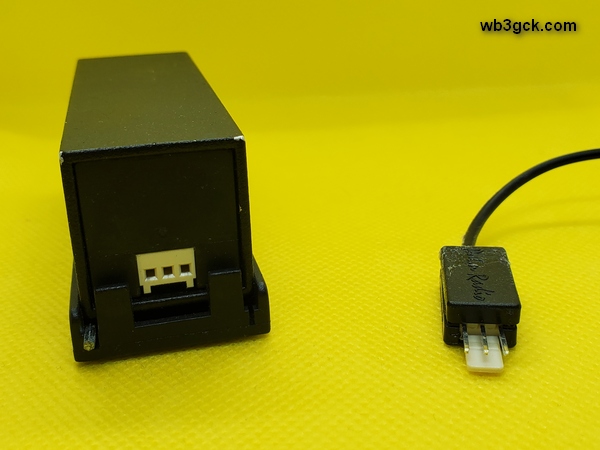
These great little paddles have one weakness: the cable connection. The three-pin connector is similar to standard header pins with a two-piece plastic backshell held together with a tiny screw. Once inserted into the paddles, there’s no locking mechanism to hold it in place. It’s definitely not the most rugged arrangement. After my first encounter with cable issues, I ordered a couple of replacement cables. Sadly, that’s no longer an option.
During my most recent episode of cable problems, the connector backshell had fallen apart, leaving the tiny wires exposed. I grabbed a spare cable and was back in business in short order.
Fortunately, after some searching, I found the two backshell pieces on the floor of my truck. The screw that holds the backshell together goes into a threaded boss, which had broken. I encountered an identical failure on another cable a couple of years ago, so I knew how to deal with it.
After I got home, I carefully checked the wire connections and confirmed that they were still intact. So this time, the fix was just to reassemble the backshell. Since I could no longer screw the two halves back together, I had to resort to drastic measures. I call this the “final fix.” Once implemented, it can’t be undone.
This photo shows the rear of the Palm Mini Paddles (left). On the right is the connector I repaired by gluing it back together. In my haste to repair the cable, I neglected to take pictures of the inside of the connector.
I positioned the connector in the bottom half of the backshell and re-checked the connections. Then, I applied a dollop of Goop™ adhesive inside the backshell and put the top half on. The Goop™ filled the inside of the backshell, holding it all together and providing some additional strain relief for the tiny wires. After cleaning off the adhesive that squeezed out during assembly, I clamped the backshell overnight. The next morning, I gave it a test and confirmed that everything was still working.
I’ve seen webpages describing ways of replacing the fragile connector with something more robust. I’m not quite ready to perform major surgery on my beloved Palm Mini paddles. Someday, I suppose, I’ll have no choice.
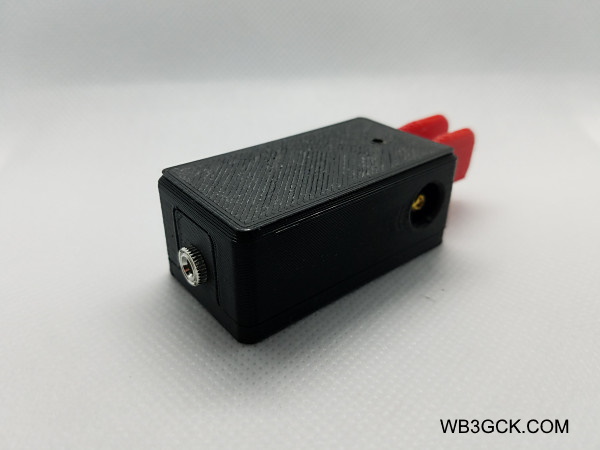
Once a day, I receive an email from eBay showing the latest listings for CW keys. In one of those emails, a small and inexpensive set of 3D-printed paddles caught grabbed my attention. My curiosity got the better of me, and I ordered some.
The primary reason for my interest was the size. I normally use Palm Mini paddles attached to a clipboard, when I’m out operating portable. The eBay listing offered paddles that were a bit smaller than my Palm Mini paddles. The Palm paddles are no longer available (much to my chagrin), so I was curious if these cheap paddles might be a viable alternative. Given the low price (around $15, shipping included), I had no delusions that the no-name paddles would be as good, though.
They are available in 3 sizes. The two larger paddles have magnetic bases. I bought the smallest one (3x8x2 cm), which had the potential to work with my clipboard setup. They are intended for two-handed operation but I figured I could improvise some sort of magnetic base for them.
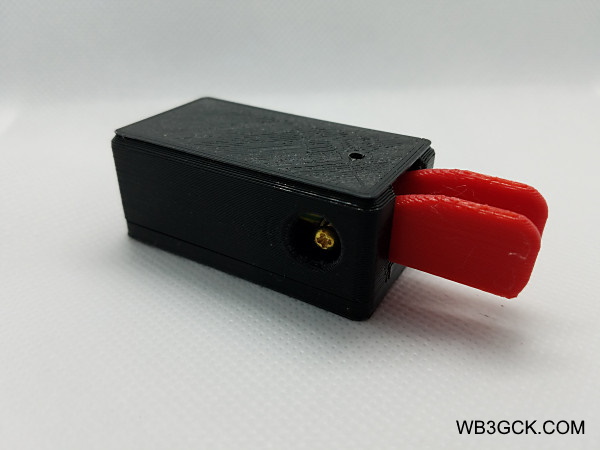
Unbranded, 3D-printed paddles from eBay. The screw (one on each side) adjusts the paddle contact spacing.
As mentioned earlier, they are 3D-printed. The seller cautions: “Can’t work in high temperature environment!” The term, “high temperature,” is undefined. I’m sure I would start to wilt in the heat long before the paddles.
It took a couple of weeks to receive my paddles from Hong Kong. Besides the paddles, the package contained a 3-foot patch cable with 3.5mm stereo plugs. There was no documentation but none was needed.
Read view of the small, un-branded, 3D-printed paddles from eBay. The rear connector is a standard 1/8-inch stereo jack.
Out of the box, I found the contact spacing to be much wider than I’m accustomed to. Fortunately, the paddles have access holes on each side to adjust the spacing. A few tweaks with a Phillips screwdriver got the spacing closer to my liking.
It was easy to fashion a magnetic base. Using some two-sided foam mounting tape, I added two strong magnets to the bottom of the paddles. The magnets didn’t line up exactly with the washers on my clipboard but they held pretty well.
You’re probably wondering how they work. Well, they are about what you’d expect from $15 paddles. For sure, they lack the solid, precise feel of my more expensive Palm paddles. The paddle arms have what I call, “vertical slop.” By that I mean you can wiggle them up and down. Also, the paddles’ contacts aren’t the greatest. They are just the threaded ends of two machine screws contacting the threads of a vertically-mounted machine screw.
With the “vertical slop” and the rough contacts, you don’t always get clean contact closure. To me, it feels like the contacts sometimes “scratch” when they close. The left paddle also sticks occasionally. At higher speeds (20+WPM), they can be challenging. That said, I am able to coax decent-sounding code out of them at moderate speeds—if I’m careful.
As they say, you get what you pay for. These paddles won’t be replacing my Palm Mini paddles anytime soon. They don’t have the smooth, quality feel of my Palm paddles—or any other paddles I own. Not by a long shot. I concede, however, that comparing these $15 paddles to more expensive products is not entirely fair.
CW keys and paddles are always subject to personal preferences; however, if you are on a limited budget, these paddles might work for you. It certainly won’t cost you a lot to find out.
73, Craig WB3GCK
[Disclaimer: I have no financial interest in these products whatsoever.]
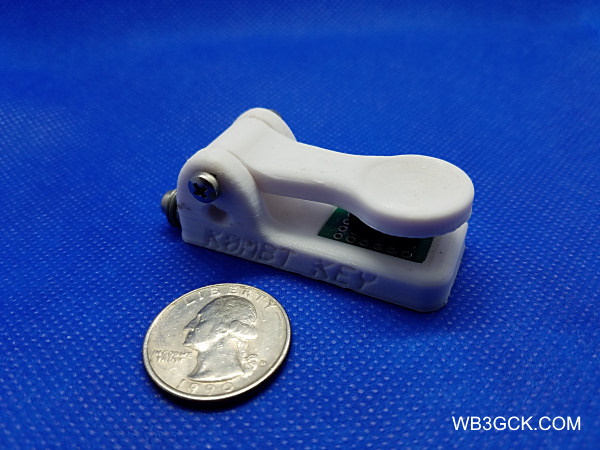
OK, I admit it. I have a fascination with tiny straight keys and paddles. With the proliferation of 3D printers, there are a lot of neat, innovative products available these days. This unusual little key from Dave Balfour KØMBT is a good example. [Update 3/16/2020: Dave recently changed his callsign to ADØB.]
Dave got started in 3D printing as a hobby a few years ago. A while back, he started sharing his straight key designs with his fellow SKCC members on the SKCC mailing list. That generated some interest and, before long, Dave was offering his keys for sale. As of this writing, Dave is offering straight keys in two sizes and a single lever paddle that can be used as a sideswiper (aka cootie) key.
I ordered the smaller of Dave’s straight keys, which he calls the “Mini-Mini.” Dave promptly shipped one and I had it a few days later. When I opened the box, I was immediately intrigued by this little key.
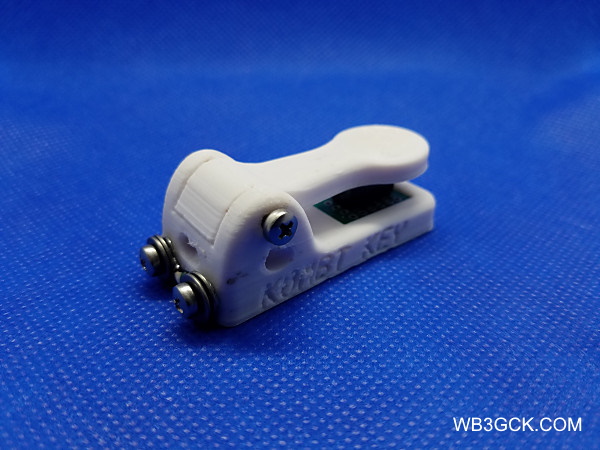
K0MBT “Mini-Mini” Key
When I say “little,” I mean “little.” Overall, it measures approximately 2-1/4″ L x 1″ W x 3/4″ H and weighs in at a minuscule 0.7 oz. (19g). Instead of a traditional knob, Dave uses a novel indentation on the keying lever. The other unique thing is the switch he uses instead of the contacts. A little computer mouse switch provides both the contact closure as well as the return spring. As a result, there are no adjustments for contact spacing or tension. It doesn’t get much simpler than this.
On the rear of the key, there are two terminals for connecting the wires of your choice. There are holes on each side of the key, that meet at the two terminals. You can route your wires in from the side, providing a little strain relief.
Rear view of the K0MBT “Mini-Mini” key
When I first grasped the key, my forefinger instinctively went into the indentation and it felt very natural. Despite the lack of adjustments, the key has a nice feel to it. With it just sitting on my desk, I can send code without the key sliding around too much. With the cable I’m using, though, it can sometimes feel like “the tail wagging the dog.” It’s not a huge issue, as long as I’m careful.
Kudos to Dave KØMBT for this unique and fun little key. If you’d like more information on Dave’s keys, look him up on QRZ.com or download Dave’s PDF file describing his offerings.
73, Craig WB3GCK
[Disclaimer: I have no financial interest in this product whatsoever.]
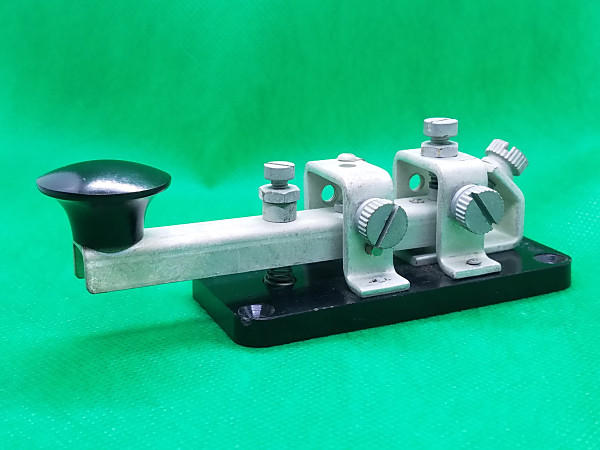
While puttering around the shack this morning, I came across an old key I had all but forgotten. It’s a Westclox Canadian military key that I acquired back when I was first licensed. It has been tucked away in the back of my desk drawer for most of the past 44 years. I can’t remember ever using it on the air, so I figured it’s time to give it a fresh look.
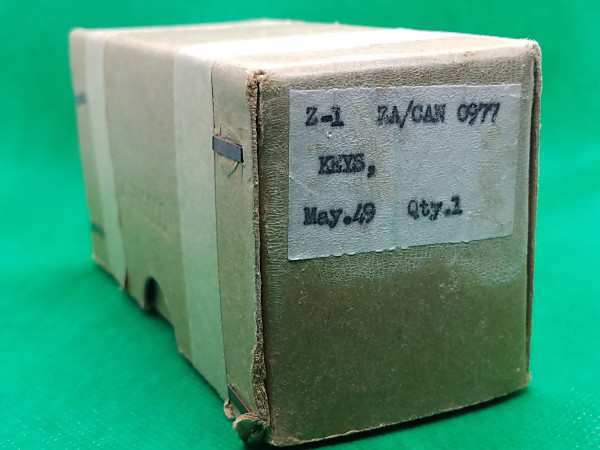
Westclox Canadian military key. According to the original box, it was manufactured in May 1949.
It seems like I’ve had this Westclox key forever. I remember buying it from a mail-order military surplus house around 1975. It was in excellent condition and appeared to be unused. The label on the box reads: Z1 ZA/CAN 0977. The box also shows a manufacturing date of May 1949. An identical key is shown on the W1TP website. The PA3EGH website also shows some similar keys.
Original box for the Westclox Canadian military key.
I don’t remember what I paid for it, but it wasn’t very expensive. I took a quick look at eBay this morning and I saw these keys listed anywhere from $80 to an outrageous $750.
One of the reasons it hasn’t seen much use is its “feel.” Unlike the J-38 style keys I used in the Navy, the contacts on the Westclox key are behind the fulcrum. This results in a “feel” that was a bit unusual to my taste.
The other issue with this key is that it’s somewhat loud. At one time I considered using it for portable operating while camping. However, I don’t think it would be a good choice for early morning operating when others are still sleeping.
Having said all that, there’s still something about this key that fascinates me. I spent some time re-adjusting it and it now feels better than I remembered. I also mounted it on a wooden base for some additional stability.
Frankly, I don’t think I gave this key a fair shake back when I bought it. So, I think I’m going to put this 70-year-old key on the air this week. If it really was new/unused when I bought it, this will be the first operational use in its 70-year existence.
The material below is from a training manual used by U.S. Navy enlisted personnel studying for advancement to the rates of Radioman 3rd Class and Radioman 2nd Class (E4 and E5, respectively). This edition, dated 1967, was still around in the early 1970s when I used it. While it may provide a nostalgic look back for former Navy radio operators, much of the material on technique may still be useful for today’s beginning amateur radio operators. Enjoy! — WB3GCK
Source: Radioman 3 & 2, Chapter 4, Bureau of Naval Personnel, Navy Training Course NAVPERS 10228-E, 5th Edition, 1967
Chapter 4 International Morse Code
The international Morse code is a telegraphic alphabet, with letters and numbers represented by sound patterns.
If you are a graduate of a Class A Radioman School, you were taught the Morse code, consequently much of this chapter may be of little interest to you. But, if this is your first acquaintance with the code – if you are striking for Radioman from the deck force, or changing to Radioman from another rating – you have many hours of hard work ahead. Do not be discouraged on this account. Many fine Radiomen learn the code for themselves.
The letters in Morse code are represented by dots and dashes; radio operators, however, substitute the expressions “dits” and “dahs,” which closely resemble the sounds of the telegraphic hand key. The groups of dits and dahs representing each letter must be made as one unit, with a clear break between each dit and each dah, and a much more distinct break between the letters. A dit is one-third the length of a dah.
You must never try to count the dits and dahs. Do not let yourself get in the habit of doing so. It is a temptation at first, but you won’t be able to count fast enough when the code speed picks up. Learn sound patterns instead. To understand what a sound pattern is, rap out the pattern beginning “Shave and a haircut.” You recognize this from its characteristic rhythm, not because it has a certain number of beats in it. You must learn the code the same way. There are 36 Morse sound patterns for the letters and numbers, plus a few others representing prosigns and punctuation marks. With study and drill you can learn to recognize each pattern as fast as you now recognize “Shave and a haircut.” The accent always falls on dahs, and you should pronounce each rhythmical combination with that emphasis in mind.
Go through the alphabet several times to get the sound “feel” of the dit and dah combinations.
MORSE ALPHABET
In the pronunciation guide for sounds of letters that follows, sounds are written as phonetically as possible. In the middle of a group, the short sound “dit” actually takes on the sound “di.” The phonetic alphabet is included in parentheses after the letters. Acquire the habit of referring to the letters phonetically.
Letter Pronunciation
A (ALFA) -------- di-DAH
B (BRAVO) ------- DAH-di-di-dit
C (CHARLIE) ----- DAH-di-DAH-dit
D (DELTA) ------- Dah-di-dit
E (ECHO) -------- dit
F (FOXTROT) ---- di-di-DAH-dit
G (GOLF) -------- DAH-DAH-dit
H (HOTEL) ------- di-di-di-dit
I (INDIA) -------- di- dit
J (JULIETT) ----- di-DAH-DAH-DAH
K (KILO) --------- DAH-di-DAH
L (LIMA) -------- di-DAH-di-dit
M (MIKE) -------- DAH-DAH
N (NOVEMBER) --- DAH-dit
0 (OSCAR) ------- DAH-DAH-DAH
P (PAPA) -------- di-DAH-DAH-dit
Q (QUEBEC) ----- DAH-DAH-di-DAH
R (ROMEO) ------ di-DAH-dit
S (SIERRA) ------ di-di-dit
T (TANGO) ------- DAH
U (UNIFORM) ----- di-di-DAH
V (VICTOR) ------ di-di-di-DAH
W (WHISKEY) ----- di-DAH-DAH
X (XRAY) -------- DAH-di-di-DAH
Y (YANKEE) ----- DAH-di-DAH-DAH
Z (ZULU) -------- DAH-DAH-di-dit
Number Pronunciation
1---------------- di-DAH-DAH-DAH-DAH
2---------------- di-di-DAH-DAH-DAH
3---------------- di-di-di-DAH-DAH
4---------------- di-di-di-di-DAH
5---------------- di-di-di-di-dit
6---------------- DAH-di-di-di-dit
7---------------- DAH-DAH-di-di-dit
8---------------- DAH-DAH-DAH-di-dit
9---------------- DAH-DAH-DAH-DAH-dit
0---------------- DAH-DAH-DAH-DAH-DAH
[Note: The codes shown below for Left and Right Parentheses are reversed from those shown in ITU Recommendation, ITU-R M-1677-1 (10/2009). — WB3GCK]
Punctuation Mark Pronunciation
Hyphen (dash) ---- DAH-di-di-di-di-DAH
Parenthesis L ---- DAH-di-DAH-DAH-di-DAH
R ---- DAH-di-DAH-DAH-dit
Point ----------- di-DAH-di-DAH-di-DAH
Slant ------------ DAH-di-di-DAH-dit
Apostrophe ------- di-DAH-DAH-DAH-DAH-dit
Colon ------------ DAH-DAH-DAH-di-di-dit
Comma ---------- DAH-DAH-di-di-DAH-DAH
Question mark ---- di-di-DAH-DAH-di-dit
STUDYING CODE
If you have any trouble learning Morse code, the following method may be helpful. Go through the three groupings of short, medium and long sounds with their accompanying practice words. Make up words of your own if you wish to give yourself further practice. Speak the practice words in code. Say “tee: DAH dit dit;” “mine: DAH-DAH di-dit DAH-dit dit.”
If you can speak words in code rapidly and distinctly, you will have an easier time when you learn to receive code on the receiver. The sounds are very similar.
You probably have noticed by now how numerals slow your speech in oral transmission. That is understandable – they also slow the speed of radio transmission. Headings containing procedure signs, calls, and numerals are transmitted at a slower rate of speed than straight alphabetical characters.
Short sounds Practice words
E dit TEE ATE EAT TEA MEAT
T dah MEET MINE TIME MAINE
A di-DAH TEAM AIM NITE TAME TEA
I di-dit MATE TAME NAME MITE
M DAH-DAH MIAMI MAMA MEAN MAN MAT
N DAH-dit EMIT MINT MANE TAN ITEM TINT
Medium length sounds Practice words
D DAH-di-dit MUST SAME MAMA SUIT AUTO
G DAH- DAH- dit MUSS OUST MUSE MUTE ATOM
K DAH-di-DAH TAUT MAST MASS SUET SAM
0 DAH-DAH-DAH WIND SEA TUM SAW OAT
R di-DAH-dit SUE SAT WED SUM MUD IOU
S di-di-dit USE SEAM WOOD DARK
U di-di-DAH GEORGE DOWN KIND SORT
W di-DAH-DAH DOOR MASK WORK GROW
WOMAN EDGE GAGE
WIGS WORM WAGER
WAKE KEG
Long sounds Practice words
B DAH-di-di-dit VAT VET VIM HAM SIX
C DAH-di-DAH-dit SAY
F di-di-DAH-dit HAS HAT EVE CUT
H di-di-di-dit CAM VEST
J di-DAH-DAH-DAH HEAT HAVE MUCH
L di-DAH-di-dit THAT EACH
P di-DAH-DAH-dit COAT ACHE SAVE HUSH
Q DAH-DAH-di-DAH ACME
V di-di-di-DAH CUTE BAKER CHARLIE
X DAH-di-di-DAH FIVE
Y DAH-di-DAH-DAH HOW JIMMY LIKE
Z DAH-DAH-di-dit PAPA QUICK QUILL
VICTORY XRAY YOUNG
ZERO BUZZ GARGLE
FIZZLE LYNX OXYGEN
WAX QUAY JERKY WHIP
QUEBEC
Figure sounds
1. di-DAH-DAH-DAH-DAH
2. di-di-DAH-DAH-DAH
3. di-di-di-DAH-DAH
4. di-di-di-di-DAH
5. di-di-di-di-dit
6. DAH-di-di-di-dit
7. DAH-DAH-di-di-dit
8. DAH-DAH-DAH-di-dit
9. DAH-DAH-DAH-DAH-dit
0. DAH-DAH-DAH-DAH-DAH
RECEIVING
If you have carried out the recommendations made up to this point, you are ready to receive code transmitted to you on an oscillator. The ship or station to which you are attached is almost certain to have practice oscillators for your use.
An experienced Radioman will key code groups to you for your training. The sound produced by an oscillator closely resembles the sound of code from the radio receiver. The operator keying to you for practice should transmit each individual character at the standard rate of 20 words per minute. He should maintain a fairly long interval between characters. As you progress, you gain speed by shortening spaces between characters.
The standard character speed is shown in figure 4-1. Note that the characters themselves may be keyed at 20 words per minute, but that the longer intervals between characters and words materially decrease the beginner’s overall speed. Note also that the code, compared against time in the 20-words-per-minute transmission, is in the proper form of having the dit as a unit. There is one unit between each element of a character, three units between each character, and seven units between each group or word.
After learning the sound of each character at this rate of speed, it is not difficult to reduce the time between characters and to copy code at a much faster speed.
As you advance in rating, you will be required to increase your transmission and reception speed. If you learn the fundamentals well, it will be fairly easy for you to increase your speed. When copying code, if you miss a character, don’t stop to worry about it; get the next character and let the one missed go by. Be a competent operator. Make every transmission and every reception accurately. Do not place speed before accuracy.
PRINTING CLEARLY
Learn to print clearly and rapidly. The messages you handle are important, and someone must read what you have written without puzzling over it. Examine figure 4-2 and compare the printed letters with your own. Notice that the sequence of strokes for some letters may be different from the way you customarily form them. As an aid to rapid printing, the more of the letter you can form with a single stroke, the better. Use this illustration as a guide to avoid confusions between printed letters and printed numerals. Especially watch the letter Z and the numeral 2. If you wish, write Z with a line through the stem (-Z). Even more important is the distinction between the capital letter O and the figure zero. In communication work, zero is always written with a slant through it (Ø). Exercise care to avoid confusion between letter I and figure 1, and also letter S and figure 5.
As your code speed increases, you will find it impossible to print rapidly enough to keep up; therefore, typewriting is a skill also required of all Radiomen. Use of a good commercial text can help you master touch-typing. A typing course for beginners also is offered by USAFI.
SENDING
Your ability to send well depends mainly upon two capabilities. First, you must know the correct sound of the character you are attempting to transmit. Second, you must know the proper method for keying with perfect control. Practicing the code aloud, as well as receiving it by oscillator, has given you a good knowledge of code sound. The proper method for keying is your next concern.
HAND KEY
The first key you will use is the hand key. The hand key is widely used on radiotelegraph circuits and with practice oscillators. It must be adjusted properly before you can send clearcut characters. Figure 4-3 shows a hand key, with parts labeled.
KEY ADJUSTMENT
The spring tension screw, behind the key button, controls the amount of upward tension on the key. The tension desired varies with operators. Too much tension forces the key button up before the dahs are completely formed; spacing between characters is irregular, and dits are not clearly defined. If the spring tension is very weak, characters run together and the space between characters is too short.
The gap between the contacts, regulated by the space adjusting screw at the back of the key, should be set at one-sixteenth inch for beginners. This measurement does not apply to every key and operator; it is a matter of personal preference. Some operators like a closed key, others an open key. “Closed” and “open” are terms for a short and a long gap. As the student progresses, further gap adjustment may be made to suit his sending speed. Contacts that are too close have an effect similar to weak spring tension. Contacts that are spaced too far have the same effect as too much spring tension.
The final adjustment of the key is the sidewise alignment of the contact points. This alignment is controlled by the trunnion screws at either side of the key. If they are too tight, the key lever binds. If they are too loose, the contacts have sidewise play. Usually, when the sidewise alignment is correct, no further adjustment is required.
POSITION OF HAND ON KEY; WRIST MOVEMENT
Learn from the beginning the correct way to grasp the key. Do not hold the key tightly, but let your fingers rest lightly on the key knob. Your thumb rests against the side, your forefinger rests on top of the key, your other fingers are bent slightly in a relaxed position. Check figures 4-4 and 4-5 for the correct method of keying. To ensure correct movement of your wrist and forearm, your arm should lie on the operating desk. The muscle of your forearm – not your elbow – should support the weight of your arm. Your elbow should not extend over the edge of the table, because the pressure of the underside of your forearm will partly block circulation and tire you. Sit upright, with your arm in line with the key.
Your ability to transmit depends to a great extent on acquiring the proper movements of your wrist and hand while operating the key. To close the key, your wrist moves upward and your hand rocks downward toward your fingertips. To open the key, these two movements are reversed- your wrist comes down and your hand rocks back.
Make your wrist flexible. Limber it up. Correct wrist action may be developed by moving your wrist up and down like a hinge. Another exercise is rotating your hand in clockwise circles, with your wrist held in a stationary position. These exercises will relieve any undue tension you may experience when first beginning to transmit.
SEMIAUTOMATIC KEY
The semiautomatic key, also known as the bug or speed key, is used chiefly when operators are required to send for relatively long periods of time. It is designed to make sending easy instead of fast. Hence, perfect control of the key is far more important than speed.
OPERATION
In sending with the bug, the thumb presses the dit paddle (fig. 4-6) to the right, and the index finger forms dahs by pressing the knob to the left. The key sends successive dits when the paddle is held to the right. One dit or a series may be sent, depending on how long the thumb pressure is maintained against the paddle. One dah is formed every time the knob is pressed to the left. Dahs must be sent individually. While sending, the hand pivots at the wrist; the hand and arm motion is horizontal.
KEY ADJUSTMENT
Best operation of the semiautomatic key is obtained when it is adjusted to send dits and spaces of equal length. Adjust the key as follows, locating the parts in figure 4-6 when adjusting the key:
Adjust the back stop screw until the reed lightly touches the deadener. Tighten the locknut.
Adjust the front stop screw until the separation between the end of the screw and the reed is approximately .015 inch. Tighten the locknut.
Operate the dit paddle to the right. Hold the lever in this position and stop the vibration of the reed. Adjust the dit contact adjusting screw until the dit contacts barely touch. Tighten the locknut. This adjustment determines whether the dits will be too heavy, too light, or perfect. The adjustment must be made without flexing the contact spring.
If the dits are too fast, move the weights, located on the reed, in the direction of the deadener. If the dits are too slow, move the same weights in the opposite direction.
Adjust the dah contact adjusting screw to a clearance of approximately .030 inch.
Adjust the dit refractive and dah tension springs for the most comfortable, operation.
If the adjustment instructions are followed carefully, the bug makes 25 or more dits before stopping. The first 12 to 15 dits will be practically perfect, with the dits and spaces equal.
SENDING EXERCISES
Good operators have sending rhythm, and you can acquire it in just one way: by practice.
It may be difficult for you to key correctly at first, because your wrist is unfamiliar with the type of movement required for sending telegraphic code. Your wrist will be stiff, and you’ll have to get rid of that stiffness by a lot of practice. Don’t favor the stiffness of your wrist. If you do, your sending will be choppy.
The following exercises have been prepared carefully. Use them as an instruction guide.
Character E: The dit characters require a “goodfist.” They must be transmitted quickly and rhythmically. Make a series of Es (dits). They are made with a pronounced movement of your wrist upward, returning to the normal position after each dit. At first, maintain a fairly long interval between dits. To assist you in limbering your wrist, exaggerate the movement upward. To prevent tenseness and tiredness of your wrist, remove your hand from the key periodically and flex your wrist. After practicing Es for 15 or 20 minutes, decrease the interval between dits until you are making them rather rapidly. Each sound should continue to be a definite dit, however. Keep at it until you can control each dit.
Character I: When you feel that your wrist is limbering up, make the character I (di-dit). Start with your wrist in the normal relaxed position, raise it for the first dit, lower it quickly halfway back, and make the second dit with another quick movement of your wrist upward. Your transmission, made slowly, produces the sound di-dit. As you practice and develop more rhythm, this character acquires the sound of di-dit.
Character T: Send a series of Ts (DAH) with a good interval between them. Instead of a quick movement of your wrist upward, make aslower, more definite movement of your wrist and exert more pressure on the key. Send dahs for a few minutes, gradually shortening the interval between characters.
Character M: Now try sending strings of Ms (DAH-DAH). As with the character 1, you don’t return your wrist to the beginning position at the end of the first dah, but bring it to the halfway point and then make the last dah. With practice, you’ll soon change the hesitant DAH DAH sound to the snappy DAH-DAH. Don’t forget the correct wrist movements. If you find that your sending requires exertion of forearm muscles or that your shoulder is moving, stop and recheck your wrist motions.
Try these practice groups several times, backward and forward. Make them clearly and distinctly, spending more time on characters that cause you any trouble.
MEET EMIT MITE ITEM
Character A: The character A (di-DAH) gives you practice in making a dit and a dah together. Sending motions, in their proper order, are (1) slight pressure of your fingers alongside the key, (2) a quick surge upward of your wrist, (3) a slight relaxing of your wrist to the halfway point, and (4) a final definite upward movement of your wrist. This technique produces the sound dit DAH when you begin to practice it. But keep at it-you’ll soon have the proper di-DAH sound. Avoid tenseness; relax your forearm muscles when sending.
Character U: You’re now ready for the character U (di-di-DAH). Start slowly, sending dit dit DAH. Practice it until you get a di-di- DAH sound.
Character N: The character N (DAH-dit) requires only slight pressure on the sides of the key, a strong wrist movement upward, a half return, and a quick, short, upward motion for the dit. Practice for several minutes until you are able to send DAH-dit easily and with com- plete relaxation.
Character D, Try the letter D (DAH-di-dit). At first, with the correct wrist movement it will be DAH dit dit. But the sound you want to hear is DAH-di-dit-with a swing. Send Ds until you can transmit them with perfect control. Check yourself on the following groups. You should have less difficulty than you did with the first groups.
MINED UNITED READY MAUDE TEAMED
Character S: Go back to the dits for S (di-di-dit). Get a good position on the key and put your wrist to work. See how quickly you can change the dit dit dit sound to di-di-dit. Relax your forearm.
Character V: The letter V is di-di-di-DAH, so you’d better learn how to send it that way. Relax. If your wrist is tied up in a knot, you’ll be sending dit dit dit DAH. Move your wrist up and down easily until you are sending di-di-di-DAH with perfect control. Practice this letter carefully. It is used in every radio test.
Character 0: Correctly sent, characters is DAH-DAH-DAH. Keep at it until it stops sounding like three Ts. Test your skill with these words:
DOOM MOST ROAD MOTOR WORST MOTION WOKE ANCHOR DOMO
Character H. Character His di-di-di-dit. Send one. If it sounds similar to four Es, your wrist is too stiff. Develop the di-di-di-dit sound.
Character B: Send DAH-di-di-dit. It is the Morse code equivalent of B. Practice for perfect control, then try these groups:
SOB BASSINET BIND BESTED BEAUTY SNOB BABBITT BURST
Character K: At this point you should be prepared to tackle the other characters. They are mostly combinations of the letters you have practiced. Each one has a distinct overall sound. For instance, K should not have the sound DAH-dit-DAH. It should be DAH-di-DAH. Think of the tune “Over There.” You will realize that DAH-di-DAH has the same rhythm as OH-ver THERE-DAH-di-DAH.
Character Q: The letter Q (DAH-DAH-di-DAH) has the same rhythm as the words “Payday today.” Say in a monotone “payday today,” then say DAH-DAH-di-DAH. When transmitted, the same swing is given these combinations as when speaking or chanting them.
Remaining letters and numerals: The preceding l5 characters have taught you proper wrist movement. You know the remaining 11 letters and 10 figures. Following are 14 practice exercises. Use these exercises for self-drill.
PRACTICE EXERCISES
Practice the remaining letters of the alphabet and the numerals. When you think you’re ready for it, practice the code exercises that follow.
1. E E E T T T A A A N N N I I I S S S H H H
M M M O O O E E E T T T A A A N N
I I I S S S H H H M M M O 0 0 E E E T T T
I I I M M M A A A N N N S S S O 0 0 H H H
E E E T T T E E E T T T I I I M M M I I I
M M M A A A N N N A A A N N N S S S
O O O S S S
2. U U U V V V D D D B B B K K K C C C
W W W J J J P P P U U U V V V D D D
B B B K K K C C C W W W J J J P P P
W W W J J J P P P U U U V V V K K K
C C C B B B D D D U U U D D D V V V
B B B P P P J J J C C C K K K W W W
D D D B B B V V V U U U W W W J J J
3. R R R L L L F F F G G G Z Z Z X X X
Y Y Y Q Q Q R R R L L L F F F G G G
Z Z Z X X X Y Y Y Q Q Q G G G Z Z Z
F F F L L L R R R Y Y Y Q Q Q R R R
X X X Z Z Z R R R F F F L L L Q Q Q
Y Y Y G G G Q Q Q Y Y Y R R R
4. 1 1 1 2 2 2 3 3 3 4 4 4 5 5 5 6 6 6 7 7 7 8 8 8
9 9 9 Ø Ø Ø 1 1 1 2 2 2 3 3 3 4 4 4 5 5 5 6 6 6
7 7 7 8 8 8 9 9 9 Ø Ø Ø 1 1 1 2 2 3 3 4 4 5 5
6 6 7 7 8 8 9 9 Ø Ø 1 1 2 2 3 3 4 4 5 5 6 6 7 7
8 8 9 9 Ø Ø 1 2 3 4 5 6 7 8 9 Ø 1 2 3 4 5 6 7
8 9 1 2 3 4 5 6
5. V U I Y Q Z C X G R S L K J P Q X Z R I
F C V B W F K D S H Q Z A L K F B V R
S T U O T M E G Y Z X V E G N I W S L H
M U A E V U A E W Q G H V C I X Z L N
R Y U K V U
6. E 8 Y 7 B 6 X 1 W Ø Z 2 A 3 C 5 S 4 1 2 F
U 1 F 5 D 8 Q 4 T 6 U 9 Q 2 E Ø S 5 U l Y
G 2 J 4 S 3 E 5 T 7 Z 8 K 6 M 9 R l A 2 R
S 7 W B E 9 R 2 A 3 Z 3 X 6 U 8 B 7 C 6 T
7. MI AN SY NL TY CE DO PS CX ZW QA PK
LN HU WC VN BM ZS CD QA IU SD LM UH
GY TR DC VT AR YU FD SA IG WQ XT ZI
NY OT ED BM LP YU GH BY RE DF LS
WQ XS ZI TY BG NH JV KL MD MI AN SY
NL TY CE DO PS
8. EF TS 16 29 83 ZJ 45 Ø7 WR ND KW IC UX
91 Ø2 1B LO FG 84 63 XW AC TM SU 5Ø 72
XR RJ ZM 43 65 VH 97 LM 12 46 7Ø FC FE
EY 34 56 27 FT FY JU IT 98 76 75 52 DE
WE QT 13 36 57 KF RI YT 19 93 35 41 FK
YU 96 Ø1 MC AR TH 19 25 3Ø UR BO UL
32 Ø5 21
9. NDT EGH RTS LYB FCC ZEX PIH CWE
LKJ QIE NUG CVT EPL SZW QAU SH
GBT VRT GIK GYO DCM XSD ZAU YER
DLN URG HNB VDX ZWS QTA GHI PT
MBY PLK RDC ESX IUP PKJ NYH GHT
DFR VED SWN VBT XFZ RDA SEN FU
GBC YRF DSE WNJ GVA SWQ QIX ZOT
MEH GKD BGV CFI ATA RUR SAC LT
NVR DAB BLM INY EGB LKO MWD SKZ
QLD YGB NDT EGH RRS FLM FCC ME
10. OVLH MYBL URXO HIZO VICT
FINX SCXS HTYV IQNT UBML
ABLB EJLN CYZB ZWCN JNDZ
UTLZ KLAB DEFZ VNUW KFRE
11. JICOY TXSTY 38Ø95 RDIHA
JXTDZ OXYDW XPZSY RSPHD
89706 CUSPI RNBRJ 65289 ZONIG
FYEQU ARQNV RNLPT KAKOZ
8784Ø BVGAN WKOQT SRQMT
UJVWN 45872 YXBCX AFKOZ
OGLCT NIHGP 12349 ATUSK
SLEWQ
12. OLMX MVNH UWQR NVUT KUXF
CDEH LYHE DIPA ZQWI AYSK
QIQA WMNW ZIHZ CAKD BTGW
WNLI PWBU OXAD XFRJ IQCA
13. ZMJXI URYNC 9347Ø PQAZM
DEGVM NCBVG HUGHY 13267
PHRAN QUECC 1289Ø MCNDH
EUIRY WQAZX IRSVZ MCURI
72439 OYTRW PIQAW CNJWO
OWQAJ OISKM 1Ø7Ø6 DGFHG
KSBOU
14. UTHA VNCB RFDS EDCD CXVD
RWQI MNJF STRO TNBL UJHK
NIOQ JUYR GBNX VCXT RJTU
BCDV CGFH 5781 JGVX HGJD
PRACTICE MAKES PERFECT
Continue sending to yourself with the practice key and oscillator. If you can operate with another striker, so much the better. Sit down at an unused operating position and tune in some slow code. It is not hard to find, especially on amateur frequencies. Copy as best you can. Don’t worry too much about missing letters. Get what you can, no matter how little it is. As your speed picks up, tune in faster code. If you find you are copying a certain speed solidly, the code is too slow. Keep it faster than you can copy comfortably.
You will need lots of practice. Class A Radioman Schools ashore run a full day, and for months a man copies code several hours daily. Make the transition from pencil copying to the typewriter as soon as possible.
As you gain skill, try copying the 18-wpm to 20-wpm fleet broadcasts. Devote as much time as possible-15 or 20 hours per week-not just an hour now and then. Do not be afraid to use some of your off-duty time. Simultaneously, begin to learn how to hold down a circuit. One of the best ways to do this is to spend several watches logging circuits that other operators are manning. At the end of every watch, compare your log with that of the regular operator, and question him about anything you do not understand. That way you see procedure in use and gain practice in copying many fists.
Learn to copy behind. If you are recording B as D, S as I, J as W, and so on, you are copying too close. The farther behind the better. At first, listen to one character while setting down the previous one. Try to fall back one letter more. Listen for the character while carrying one in your head and setting down the one before that. Once you have the knack, you will find copying behind is easier, faster, and more accurate. The faster the code, the farther, you must stay behind. Watch an oldtimer copy press at 35 or 40 wpm. You will find he is carrying anywhere from 5 words to a sentence in his head.
One further word of advice: It is common for a student learning code to hit a plateau. The regular progress to higher speeds stops, and for a time the student finds himself unable to copy faster than a certain speed. If this happens to you, just stay with it until your speed picks up. Never lose confidence in the knowledge that any man of ordinary ability can learn the code if he puts in the necessary time and work