TUMD Stainless Steel Paddles

I mentioned in a previous posting that I have a fascination (obsession) with unusual CW paddles. These paddles are the last in a series of recent purchases (but I doubt it).

These rather industrial-looking paddles are not new; they have been around for a while. They are often sold under various brand names or no name at all. The eBay listing I purchased mine from didn’t specify a particular brand, but they came branded as “TUMD.” The paddles I ordered were shipped from China and took about a month to arrive.

I’m not providing a specific link, since these things are available all over the place. Just search on “stainless steel paddles” and you’re sure to find them.

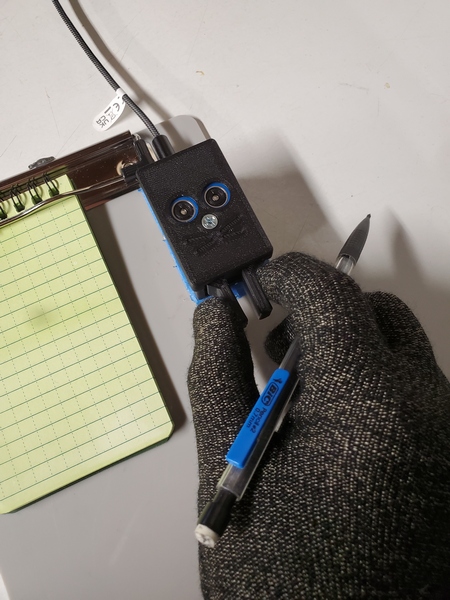
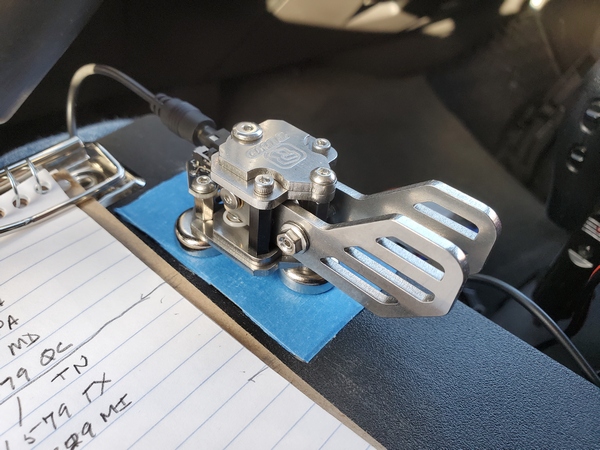
The Tumd paddles attached to my clipboard. The three magnets are super strong.

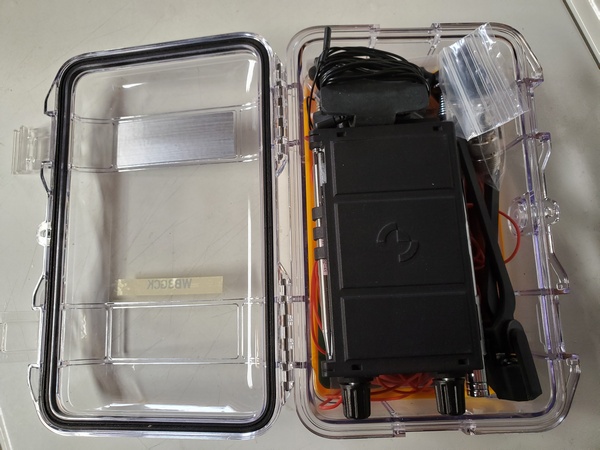
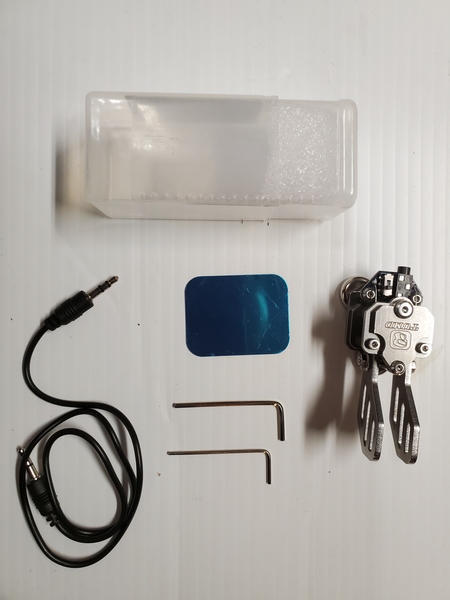
Here’s what was included in the box:

  • The paddles, of course
  • A stereo cable with 3.5mm connectors
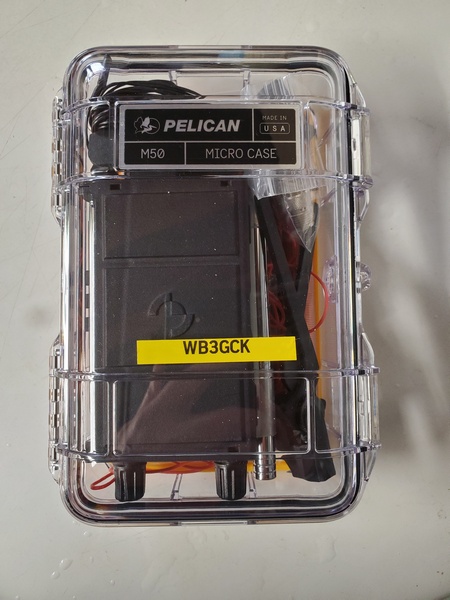
  • A two-piece plastic case large enough to hold the paddles and cable
  • Two Allen wrenches
  • A small adhesive metal disc for applying to the surface of your choice
The accessories I received with my Tumd stainless steel paddles.

The first thing that struck me was that these paddles are built like a tank. The base has three powerful magnets, which I like. At the rear of the paddles next to the 3.5mm jack, is a small slide switch for reversing the “dit” and “dah” paddles. They look great, but my purchase was not without a couple of minor issues right off the bat. 

Based on the picture in the eBay listing, I ordered a version of the paddles with smaller, square paddles. What I received, however, was a version with larger paddles reminiscent of the fins on a 1959 Cadillac. Instead of going through the hassle of returning them to China, I opted to keep them.

The next issue was adjusting the paddle spacing. As received, the paddles had different spacing. The paddles each have a hex bolt within a larger locknut of some sort. There were no instructions provided, and neither of the included Allen wrenches fit. Fortunately, Charlie NJ7V over at the Red Summit RF YouTube channel provided all the answers I needed. He has a video detailing how to adjust them and what size wrenches you need. I had the tools I needed in my toolbox, so I had the paddles adjusted to my liking in short order. 

I’ve used these paddles on quite a few outings and have grown to like them a lot. Here are some pros and cons from my viewpoint—your mileage may vary:

Pros:

  • The three magnets on the bottom are seriously strong. They hold tight to the steel strips on my clipboard. I love that!
  • Once adjusted, they have a great feel and key reliably. They do, however, require a slightly heavier touch. That’s a matter of personal preference, so others may disagree. 

Cons:

  • Weighing in at 3.8 ounces (106 grams), they are heavier than other paddles I use in the field. This is a minor issue or no issue at all, depending on how you operate.
  • You need two tools to adjust the paddle spacing. From what I’ve seen online, some sellers include both wrenches; mine did not. Again, this is also a minor issue, since the paddle adjustments hold very well and shouldn’t need further adjusting in the field.

Lately, these paddles have been my first choice for portable operation. For $50 (US) or less, they are a pretty decent value.

73, Craig WB3GCK

The Ashi Paddle 45

After my inexpensive QU-21C paddles started acting up again during a recent activation, I went on a paddle binge, ordering some new, reasonably-priced paddles to try out. First up was the CWMouse paddles, which I really like. Next was the Ashi Paddle 45 purchased from N6ARA Electronics. 

The paddles are designed and built by 7L4WVU in Japan and imported by N6ARA. I’ve had my eye on these paddles for a while, so I thought I’d buy them and give them a go.

After using the Ashi paddles on a few POTA/WWFF activations, I thought I’d document my impressions.

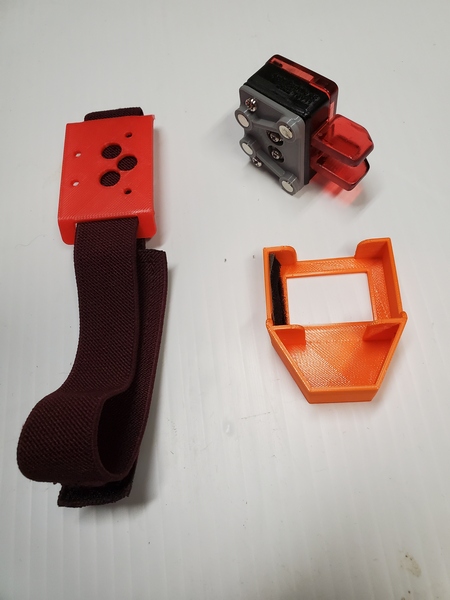
General: I was looking for small paddles to keep in my Elecraft KH1 kit, and the Ashi Paddle 45 fits the bill. They measure approximately 1-1/16″ x 2-1/8″ x 1″ (27mm x 54mm x 25.4mm) and weigh just 1.1 ounce (32g) with the magnetic mount attached. They are constructed from high quality 3D printing, and come with two mounting options: a magnetic mount and a leg strap. Two screws are provided for attaching the paddles to the mount you choose. 

The Ashi Paddle 45 leg mount (left), the paddles with the magnetic mount attached (upper right), and the protective case for the paddles.

Overall Feel: Like the CWMouse paddles, the Ashi Paddle 45 uses microswitches for the contacts. Thus, the tension and throw are not adjustable. Of course, paddle spacing and tension are matters of personal preference. Being an Iambic Mode B user, timing is critical, so I prefer narrow spacing and light tension. The Ashi paddles’ spacing seems slightly wider than the CWMouse paddles, and the tension feels just a bit heavier. 

When I first started using the Ashi paddles, I would occasionally get an extraneous “dit” when forming characters with a single squeeze, like the letter K. My guess is the microswitches are a little slow breaking contact after releasing the paddles. I have to send more deliberately and remove my fingers completely from the paddles after each character. Fortunately, it didn’t take long to get used to the feel, and I had no issues sending with the paddles. Of course, this is all based on my personal preferences, so your mileage may—and probably will—vary. 

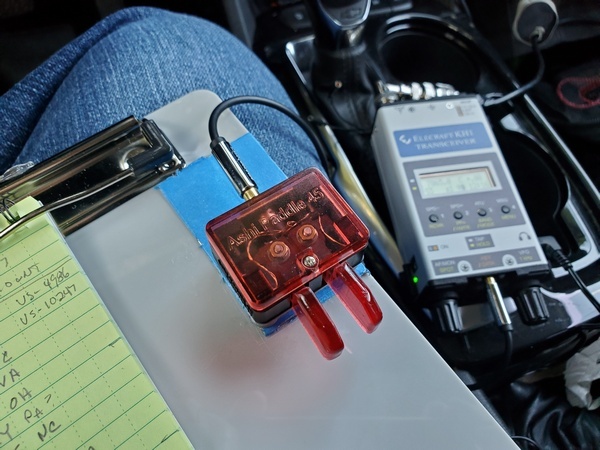
The Ashi paddles attached magnetically to my clipboard

Mounting: My preferred method of sending is with the paddles attached magnetically to my little clipboard or a kneeboard for my KH1. So, naturally, I tried the magnetic mount first. Like my QU-21C paddles, the body of the key is small relative to the paddles. This makes magnetic mounting problematic. When I attach the paddles to a steel surface (like on my clipboard), they have a tendency to move side to side when keying. I have to use my hand to keep them steady. Not a huge thing, but I’d prefer they didn’t move at all. I have an idea in mind for an improved magnetic mount. If that works out, I’ll do a separate post on it. 

Using the Ashi paddles on a KH1 kneeboard

I haven’t used the leg mount in the field, but it worked great in the shack. That would probably be a great mounting option in some situations. The leg mount is cleverly designed so that you can angle the paddles to the left or right, if you like.

Overall, I like these paddles. Once I adapted to the feel, they worked reliably in the field. So, the Ashi paddles definitely replaced my quirky QU-21C paddles in my backpack.

72, Craig WB3GCK

Trying Out a KH1 Kneeboard

I ordered a KH1 kneeboard from Tufteln, and it arrived in the mail earlier this week. I was out of town for most of the week, so today was my first opportunity to try it out. 

I drove down to Ridley Creek State Park (US-1414, KFF-1414) and headed up to one of the picnic areas. This area is one of the highest elevations in the park. My original plan was to set up in an out-of-the-way clearing in the woods, but with rain in the forecast I thought it would be smarter to stay close to my truck. (Spoiler alert: It was.)

I backed my truck into a parking space away from everyone else and set up a 12-foot whip and my homebrew loading coil on the back of the truck. Next, I ran 18 feet of RG-8x coax over to my camping chair. 

My 12-foot loaded whip mounted on my truck

I ordered the kneeboard version with a metal plate for magnetic mount paddles. Mike KE8PTX, designer of the kneeboard, recommends using a short audio cable with right-angle connectors for connecting your paddles to the KH1. I bought a couple but neglected to bring them along this morning. Instead, I used a 3-foot cable. It was a little awkward, but worked just fine. 

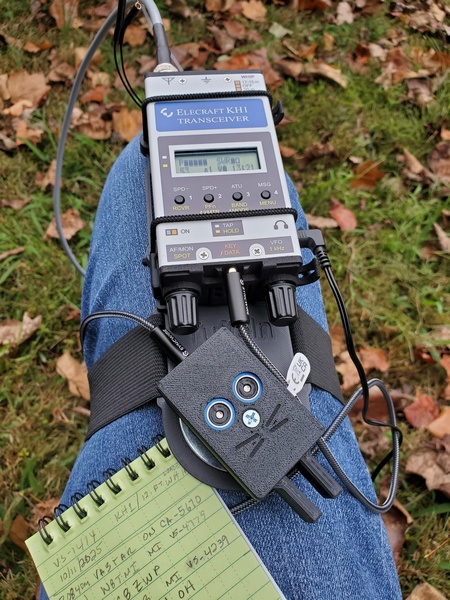
The leg strap provided with the kneeboard was easy to adjust and comfortable to use. I used my CWMouse paddles, and the magnets I glued onto them held on to the kneeboard’s metal plate with no issues. For logging, I used a 3” x 5” weatherproof notebook, which I balanced on my leg by the kneeboard. 

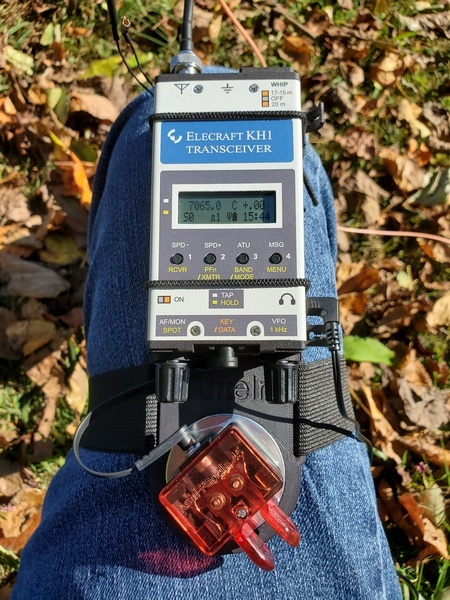
The KH1 and CWMouse paddles mounted on the Tufteln KH1 Knee Board

Settled comfortably into my chair, I got started on 40M. After logging a quick eight contacts, the hunters thinned out. I eventually made my required 10 contacts plus a few more before moving to 30M. After logging eight contacts on 30M, I moved to 20M for five more.

After an hour on the air, I felt a few raindrops and figured I had better pack up. That was an excellent decision, as it started raining as soon as I put the KH1 in the truck. I quickly took down my antenna and tossed my chair in the back of the truck.

My radio backpack

Although the rain interrupted my activation, I ended up with 27 contacts. Some highlights included:

  • I got a call from F1BLL on 20M. He was an honest 599 into southeastern Pennsylvania this morning.
  • I worked fellow Polar Bear QRP member VE3DN on 40M and 30M. 
  • W9DP and W9GTA each hunted me on two bands.

I have to say that I really enjoyed using the kneeboard. In fact, this might be my new favorite way to operate with the KH1.

72, Craig WB3GCK

KH1 Picnic Table Ops

My (far) better half and I had plans to go watch our grandson’s soccer game yesterday, but I still squeezed in a short, early morning activation. I headed over to nearby Valley Forge National Historical Park (US-0761, KFF-0761) and allotted myself an hour of operating time. While I was there, I tried out a few things with my Elecraft KH1.

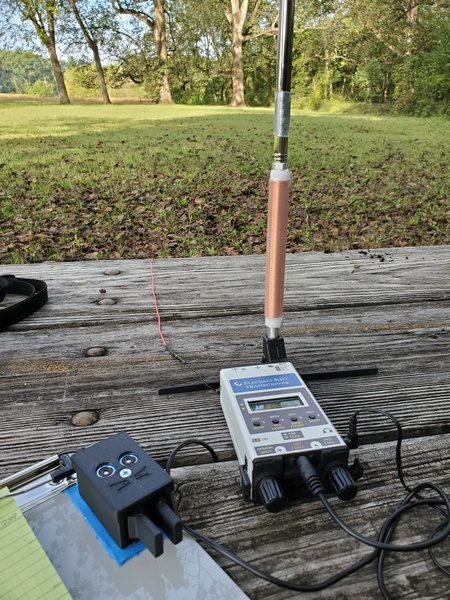
I set up the KH1 at a picnic table and used the whip antenna and AXE1 extender coil. I supported the antenna with a right-angle adapter from Tufteln. This was the first opportunity I had to use the adapter, so I was anxious to try it out. For my counterpoise, I used a homebrew setup with a 13-ft wire and a 20-foot extension for 40M.

The KH1 with the AXE1 loading coil for 40M/30M and the Tufteln right-angle adapter.

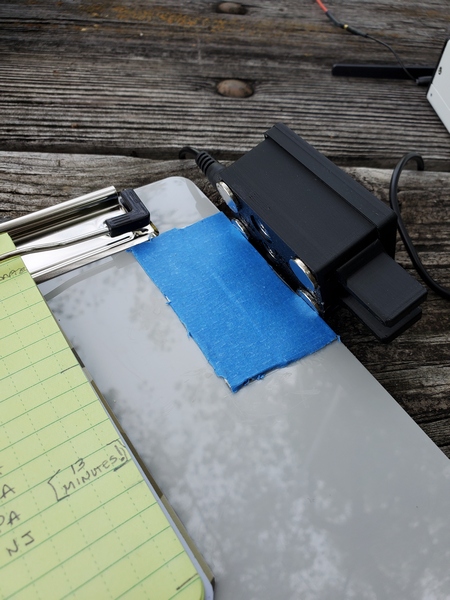
I also gave my CWMouse paddles another go. I glued four small magnets to them the night before, so I wanted to see how they worked with my clipboard. KE8PTX had a Facebook post recently in which he mentioned using painter’s tape on the metal surface of his knee board to give his paddles a little extra traction. As luck would have it, I was doing some painting this week and had some tape handy. I put some on the steel strips on my clipboard right before I left the house. 

I glued some magnets to my CWMouse paddles. The blue painter's tape helps the magnets get a better grip. You can see the notation I made in my log for my 10th contact.
I glued some magnets to my CWMouse paddles. The blue painter’s tape helps the magnets get a better grip on the steel strips glued to the clipboard. You can also see the notation I made in my log for my 10th contact.

With everything set up, I tuned up the KH1 and got started. My results on 40M really surprised me. Although my signal reports were on the low side, I was getting some decent spots on the Reverse Beacon Network. It took only 13 minutes to log my first 10 contacts. I continued making contacts for 30 minutes, while brushing ants off of my log. (I think there was an anthill under the picnic table. Doh!)

I spent the rest of my hour-long activation on 30M and 20M. There was less activity there, but I picked up a few more contacts on each band.

When my hour was up, I packed up and gave the ants exclusive use of the picnic table. I finished up with 25 contacts in my log; I’ve done much worse with much better antennas. The KH1 did an amazing job with just the whip antenna, and my modified CWMouse paddles worked great attached to my clipboard. 

As you can probably tell, I’m having fun with my new rig. 

72, Craig WB3GCK

My Bulging Battery

Last week I was using one of my Evolve III Maestro E-Books during our local ARES-RACES NBEMS digital net. I noticed the keyboard had developed a hump in the middle. Having seen this once before in another laptop, I immediately knew what was causing it: a bulging battery. As a precaution, I disabled the battery in the Windows Device Manager and continued running solely on AC power.

The next day I opened up the laptop to remove the battery. That was fairly simple to do. I just needed to remove nine tiny Phillips screws to open the case. Then I removed five more tiny screws holding the battery and unplugged the battery cable. It was a painless process. 

Searching the Internet, I found some sources for replacement batteries. I ended up buying one on eBay from a seller that ships from New Jersey. Of course, that convenience came at a price. I ended up paying $40 for a battery to put in a $90 laptop. Yikes!

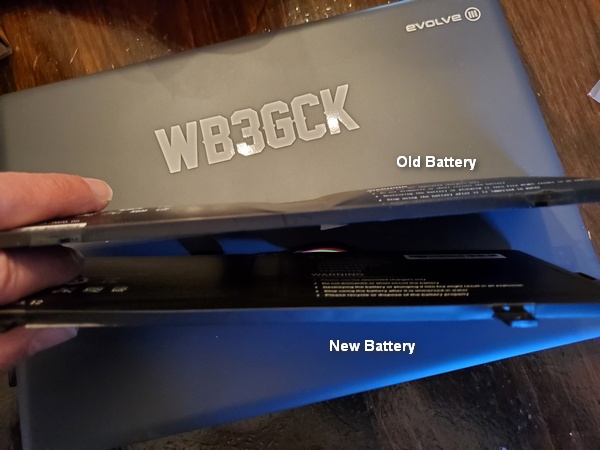
It's not a great a picture, but you can see how bloated the old battery was. In comparison, the new battery is perfectly flat.
This isn’t a great a picture, but you can see how bloated the old battery was. It’s hard to tell with the lousy lighting, but the new battery is perfectly flat.

A week after I first noticed the problem, I had a brand new battery in my mailbox. It took about 15 minutes to open the laptop, install the new battery, and put it all back together again. Happily, it survived the “smoke test” and charged up normally. Back in business!

Yeah, $40 is steep investment for such a cheap laptop, but I really like this little thing. Hopefully, it’s got a couple more years left in it. 

73, Craig WB3GCK

Captain John Smith Trail with the Gabil GRA-7350TC Antenna

My (far) better half and I spent the weekend in Central Pennsylvania watching the grandkids, while our second harmonic and her husband were off celebrating their anniversary. Of course, I took some radio gear along to do some QRP-portable operating while I was out there.

I had a brief window of opportunity on Saturday morning, so I drove to the Falmouth Access boat launch along the Susquehanna River to activate the Captain John Smith National Historic Trail (US-4567). Since we used the (far) better half’s car this weekend, I used this opportunity to try out my Gabil GRA-7350TC vertical and magnetic mount on her car for the first time. I also brought along my trusty Penntek TR-35 (5 watts, CW).

The Gabil GRA-7350TC & mag mount on my (far) better half's car, while activating the Captain John Smith Chesapeake National Historic Trail (US-4567)
The Gabil GRA-7350TC & mag mount on my (far) better half’s car, while activating the Captain John Smith National Historic Trail (US-4567)

To facilitate tuning the vertical, I used a recently acquired Mini60 analyzer I bought off AliExpress. It’s cheap and a little quirky, but it’s small and its simple SWR readings got the job done. I started on 40M and got the SWR down to 1.3:1 without adding radials. That’s better than I had ever gotten on my pickup truck. I guess the roof on my XYL’s little SUV provides a better ground plane than my truck.

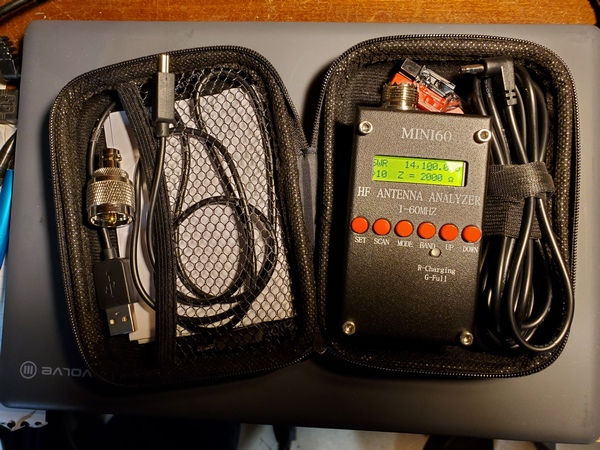
The Mini60 Antenna Analyzer. I found a case on Temu just the right size to hold Mini60 and some accessories.
The Mini60 Antenna Analyzer. I found a case on Temu just the right size to hold the Mini60 and some accessories.

Band conditions were generally lousy, and there was some horrendous local noise in 40M and 20M. I didn’t experience any noise issues the last time I activated from here. Despite all that, I managed to scrape together 17 contacts in about 35 minutes, including one with F4ILH on 17M. Also, thanks to W5KEB for working me on two bands. (My apologies to a couple of hunters I couldn’t pull out of the crazy noise in 40M and 20M.)

Even though the bands weren’t too hot, I was pleased with the performance of the Gabil antenna. It’s another good antenna option when I’m using my (far) better half’s car (or any car, for that matter). 

72, Craig WB3GCK

Oops! It Lives!

I’m almost too embarrassed to even post this, but it looks like I resolved my issues with my Elecraft T1 ATU. I think it might have been a monumental example of “cockpit error.”

This morning, a few hours after my last post went live, I sat down and went back through the T1 user manual. One line jumped out at me:

When bypassed, the T1 can still show SWR; activate TUNE mode, then key the transmitter.

Hmmm… So, that got me thinking. That would explain the behavior I have been seeing: indicating SWR while not trying to find a match.

I went downstairs to the shack to check the T1 again. When I entered the pushbutton sequence to enter the BYPASS mode, the T1 actually toggled into the “ATU Inline” mode. DOH! I connected the T1 up to my KX3 and rain gutter antenna, and it tuned up like a champ. 

So, it looks like I might have accidentally put the T1 in BYPASS mode. Two errant presses of the push-buttons is all it would have taken. I’ll have to watch out for that, going forward.

Needless to say, I’m a happy boy again. Red-faced but happy.

72, Craig WB3GCK

Equipment Failure but Activation Success

Another busy weekend here in my neck of the woods. We had a family get-together in central Pennsylvania on Saturday, and I took part in a public service event with my local ARES-RACES group on Sunday. Despite everything going on, I squeezed in a short POTA/WWFF activation on Saturday morning before heading out of town.

I chose a spot in Valley Forge National Historical Park (US-0761, KFF-0761) that’s only a few miles from home. The parking lot serves as a trailhead for a popular trail, and it can be a busy place during the summer months. It wasn’t too bad today. 

My original plan was to use some different gear and try out some antenna configurations. Being pressed for time, I went with my usual setup, which I knew—or thought—would work. That, of course, was my Penntek TR-35, Elecraft T1 tuner, and my 12-foot whip and homebrew loading coil combination. The SWR is a little higher on 40M and 30M, so I use the T1 to keep the rig happy.

I scanned the 40M band, and it was hopping. I planned to pick off some park-to-park QSOs before setting in on a frequency to call CQ. When I hit the T1, it didn’t even try to find a match, and the LEDs showed a 3:1 (or higher) SWR. I tried other bands, including ones I knew were close to 1:1, and the T1 wouldn’t budge. 

I couldn’t remember the last time I changed the battery, so I put in a fresh one. No go. Next, I ran through the T1’s internal diagnostics. Nothing out of the ordinary there that I could see. On (very) rare occasions over its 11 years of service, the T1 would get fussy and refuse to match certain bands. Just running through the diagnostics seemed enough to clear up those issues—but not today.

I disconnected the T1 and went straight from the TR-35 to the antenna. The truck-mounted whip has very low SWR on 20M and 17M, so I confined my operation to those bands. 

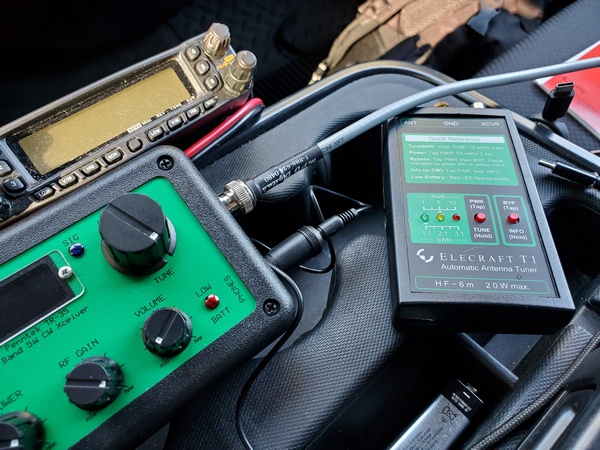
My ailing T1 after disconnecting it
My ailing T1 after I disconnected it

Fortunately, 20M was in great shape for 0930 (local time), and I had a steady stream of hunters. I needed to leave at 1000 (local), and I had spent an inordinate amount of time playing around with the T1. However, my 30-minute activation netted me 26 contacts with two of them park-to-park. Most of the contacts were on 20M, but I had five on 17M before pulling the plug. 

I drove back home, saddened that my trusty T1 was having issues. It has been so reliable over the years that I just took for granted that it would always work and match whatever antenna I was using. 

Back at home, I did a couple of quick checks with different antennas, but no joy was to be had. I suspect a stuck relay, but I’m not really sure how to discern that from the internal diagnostics routine. I bought it assembled and tested, so I’ve never poked around inside. I’ll have to download the instructions for the kit version to see if that offers any insights. 

When I get some time this week, I’ll pursue this further and decide how to proceed. If any T1 users out there have advice to offer, I’m all ears. 

[Update: I resolved the issue with the T1. It appears to have been a case of “cockpit error.” Here’s what it was.]

72, Craig WB3GCK

QU-21C Mini Paddles

I’ve been toying with the idea of putting together a small radio kit based on my (tr)SDX or something similar, so I’ve been looking at small paddles to go with it. Browsing through eBay recently, I came across several listings for the QU-21C paddles. They were inexpensive, so I thought I’d order them and give them a shot. 

These paddles are nothing new; they’ve been around for a few years. (I’m definitely no early adopter.) The QU-21C paddles are made in China and mine are marked with the brand name, Magic Rabbit. From other reviews I have seen, there may be other manufacturers. So, the quality and packaging may vary. I paid about $24 USD from a seller (iDrone) that ships from the U.S., but you can find them listed for less than $20, if you don’t mind waiting for a shipment from China. 

Opening the package, I found the paddles are even smaller than I expected. The base is approximately .98 inch by .98 inch (25mm x 25mm) and 1 inch (26mm) tall. The overall length, including the paddles, is 1.9 inches (48.5mm). On my kitchen scale, the paddles weighed in at 1.25 ounces (34 grams). The paddles appear to be 3-D printed, but the quality is pretty good. The base of the paddles is magnetic, which is one feature that first drew my attention. 

Magic Rabbit QU-21C paddles with the rubber pad attached to the magnet. The pad looks a little ratty around the edges, because I removed it and decided to put it back on. I messed it up a little in the process.
Magic Rabbit QU-21C paddles with the rubber pad attached to the magnet. The pad looks a little ragged around the edges, because I applied it, removed it, and then decided to put it back on. I messed it up a little in the process.

The package I received included:

  • Paddles with a magnet attached to the bottom
  • 3-ft cable with 3.5mm stereo plugs on each end
  • Hex wrench for adjusting contact spacing
  • Two adhesive metal discs
  • Adhesive rubber pad
  • Plastic storage case that holds everything
Some of the accessories that came with it. The cable is inside the clear plastic storage box. The adhesive discs can be applied anywhere, so you can use the attach the paddles magnetically.

My first impression was that the contact spacing seemed a little wider than I like. I used the supplied hex wrench and adjusted the spacing until the contacts were completely closed. Then, I backed off a little. 

I prefer a light spring tension on my paddles, but the spring in these paddles seems stiffer than I’m used to. Unfortunately, there’s no adjustment for that. So, I’ll just have to get used to using a little more force than my other paddles. 

I’m not sold on the magnetic base, though. The square magnet is fairly strong, but it’s highly polished. So, the paddles sometimes have a tendency to slide when I’m sending. I applied the rubber pad that comes with it, but that seemed to offer only minimal improvement. For now, I just hold them in one hand while sending with the other.

I’ve actually thought about trying to remove the magnet altogether, since it appears to be glued on. At least, it wouldn’t be attracting every ferrous object that comes near it. But, for now, I’m just thinking about it.

The QU-21C paddles during a recent activation, along with my trusty Palm Mini paddles are also shown.
The QU-21C paddles during a recent activation, along with my trusty Palm Mini paddles.

I had a chance to use the QU-21C paddles on a recent park activation. It didn’t take long to get used to them, and I had no issues with them at all. The paddles keyed reliably, without missing a single dit or dah.

Even with my spring tension and magnet gripes, I’m pretty happy with these paddles. These cheap paddles look like worthy candidates for field use. We’ll see how well they hold up over time.

72, Craig WB3GCK

Dusting Off My Z-Match

I was recently looking at some of my older gear gathering dust on the shelf, so I resolved to start putting it to use. So yesterday, before I headed out for Ridley Creek State Park (US-1414, KFF-1414), I grabbed my old homebrew z-match antenna tuner and gave my Elecraft T1 tuner the day off.

I built this tuner from scratch about 24 years ago, and it has always been one of my favorite projects. Based on a bunch of different designs, it gave me years of great service. For years, my go-to portable rig was my old FT-817 coupled with this tuner. Today, I paired the z-match with my Penntek TR-35 (5 watts, CW). I used my 12-foot whip and homebrew loading coil mounted on the truck. The loaded whip’s SWR on 40M and 30M is just slightly high, nothing the old z-match can’t handle. 

My old homebrew z-match ATU along with my TR-35

I’ve been spoiled using automatic antenna tuners lately, but tuning the z-match was a cinch. Just peak the received noise, switch in the resistive SWR bridge, key up the rig, and tweak the knobs to extinguish the LED. Then switch out the bridge and go. 

The z-match is a high-Q, narrow bandwidth device, so when changing frequencies on a band, I did a check with the SWR bridge before transmitting. It just took a minor tweak to extinquish the LED again.

It was a pretty good day on the bands. I split my time between 40M and 20M. I ended up with 28 QSOs. Among them was one park-to-park contact and one DX contact (IW2NXI). I forgot my water bottle, so my parched throat (and famously short attention span) prompted me to pull the plug after an hour on the air. Activation #20 from US-1414 was in the books.

My homebrew z-match was an integral part of my portable setups back in the day. In this picture from 2001, I was using it with a doublet fed with TV twinlead.
My homebrew z-match was an integral part of my portable setups back in the day. In this picture from 2001, I was using it with a 40M doublet fed with TV twinlead.

My little Elecraft T1 tuner certainly has a size and weight advantage over my homebrew z-match. It’s certainly is easier to use, too. However the z-match can handle both balanced and unbalanced loads, and it doesn’t need a battery.

I have some other old gear in mind for future activations. A couple of rigs could make for some challenging activations.

Stay tuned.

72, Craig WB3GCK