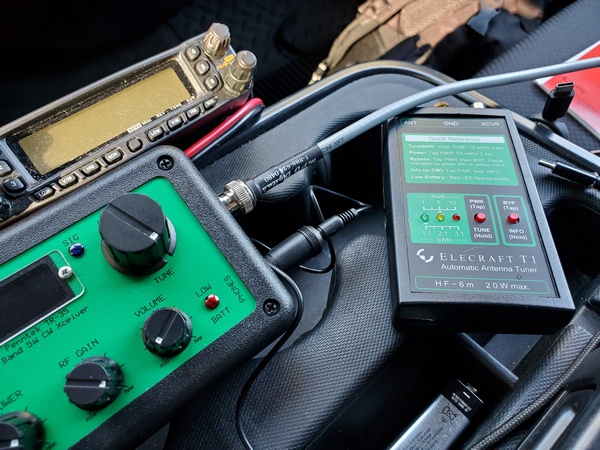
I’m almost too embarrassed to even post this, but it looks like I resolved my issues with my Elecraft T1 ATU. I think it might have been a monumental example of “cockpit error.”
This morning, a few hours after my last post went live, I sat down and went back through the T1 user manual. One line jumped out at me:
When bypassed, the T1 can still show SWR; activate TUNE mode, then key the transmitter.
Hmmm… So, that got me thinking. That would explain the behavior I have been seeing: indicating SWR while not trying to find a match.
I went downstairs to the shack to check the T1 again. When I entered the pushbutton sequence to enter the BYPASS mode, the T1 actually toggled into the “ATU Inline” mode. DOH! I connected the T1 up to my KX3 and rain gutter antenna, and it tuned up like a champ.
So, it looks like I might have accidentally put the T1 in BYPASS mode. Two errant presses of the push-buttons is all it would have taken. I’ll have to watch out for that, going forward.
Needless to say, I’m a happy boy again. Red-faced but happy.
Another busy weekend here in my neck of the woods. We had a family get-together in central Pennsylvania on Saturday, and I took part in a public service event with my local ARES-RACES group on Sunday. Despite everything going on, I squeezed in a short POTA/WWFF activation on Saturday morning before heading out of town.
I chose a spot in Valley Forge National Historical Park (US-0761, KFF-0761) that’s only a few miles from home. The parking lot serves as a trailhead for a popular trail, and it can be a busy place during the summer months. It wasn’t too bad today.
My original plan was to use some different gear and try out some antenna configurations. Being pressed for time, I went with my usual setup, which I knew—or thought—would work. That, of course, was my Penntek TR-35, Elecraft T1 tuner, and my 12-foot whip and homebrew loading coil combination. The SWR is a little higher on 40M and 30M, so I use the T1 to keep the rig happy.
I scanned the 40M band, and it was hopping. I planned to pick off some park-to-park QSOs before setting in on a frequency to call CQ. When I hit the T1, it didn’t even try to find a match, and the LEDs showed a 3:1 (or higher) SWR. I tried other bands, including ones I knew were close to 1:1, and the T1 wouldn’t budge.
I couldn’t remember the last time I changed the battery, so I put in a fresh one. No go. Next, I ran through the T1’s internal diagnostics. Nothing out of the ordinary there that I could see. On (very) rare occasions over its 11 years of service, the T1 would get fussy and refuse to match certain bands. Just running through the diagnostics seemed enough to clear up those issues—but not today.
I disconnected the T1 and went straight from the TR-35 to the antenna. The truck-mounted whip has very low SWR on 20M and 17M, so I confined my operation to those bands.
My ailing T1 after I disconnected it
Fortunately, 20M was in great shape for 0930 (local time), and I had a steady stream of hunters. I needed to leave at 1000 (local), and I had spent an inordinate amount of time playing around with the T1. However, my 30-minute activation netted me 26 contacts with two of them park-to-park. Most of the contacts were on 20M, but I had five on 17M before pulling the plug.
I drove back home, saddened that my trusty T1 was having issues. It has been so reliable over the years that I just took for granted that it would always work and match whatever antenna I was using.
Back at home, I did a couple of quick checks with different antennas, but no joy was to be had. I suspect a stuck relay, but I’m not really sure how to discern that from the internal diagnostics routine. I bought it assembled and tested, so I’ve never poked around inside. I’ll have to download the instructions for the kit version to see if that offers any insights.
When I get some time this week, I’ll pursue this further and decide how to proceed. If any T1 users out there have advice to offer, I’m all ears.
[Update: I resolved the issue with the T1. It appears to have been a case of “cockpit error.”Here’s what it was.]
Although I bought my little (tr)uSDX transceiver two years ago, it has only seen sporadic use. Other than an occasional contact or two, it has been mostly relegated to the shelf. I figured it was about time to put it to serious use in a POTA/WWFF activation.
I made a return visit to Norristown Farm Park (US-4363, KFF-4363) for another activation. It was raining on and off this morning here in southeastern Pennsylvania, so I pretty much had the place to myself.
I set up the (tr)uSDX with my Elecraft T1 tuner in the cab of my truck. I used three 18650 Li-ion batteries power the radio. As usual, I went with my 12-foot whip and homebrew loading coil on the back of the truck.
I’m getting a little better at navigating the (tr)uSDX’s menus and using the controls. There are a lot of functions covered by three controls. To refresh my memory, I used the rig last night with my rain gutter “antenna” to make a couple of contacts. I also brought along a cheat sheet today, which I didn’t need.
Just for the fun of it, I started off using my little N6ARA TinyPaddles. They match the orange radio, so why not. Unfortunately, I had some issues with them, so I switched over to my Palm Mini paddles. I have to tweak the contact spacing on the N6ARA paddles.
My (tr)uSDX. The N6ARA TinyPaddles are in the lower left.
Starting out on 40M, the signals were strong and plentiful. It only took me about 11 minutes to log my first 10 contacts. When things slowed down on 40M, I made a few contacts each on 30M and 20M. After 45 minutes, I had 21 contacts in the log with one park-to-park QSO.
My trusty homebrew loading coil. In hindsight I should have used a plastic bag to protect it from the rain this morning.
The (tr)uSDX is an incredible little rig. They packed an awful lot of features into a tiny package, but it’s not really a high-performance radio. I have to admit it wasn’t the most pleasant rig to listen to; there were some pops and clicks in the sidetone when keying. It could have been the earbuds I was using. I also need to go back through the menu settings to make sure I haven’t missed something. Looking at my RBN spots, I could see I need to tweak the frequency calibration a bit. It’s transmitting a little lower than the displayed frequency. Having said all that, I can’t be too critical of radio at this price point.
In the end, though, the little rig got the job done today. Not bad for a five-band, multi-mode radio that costs less than $140 assembled.
I’ve been powering up some of my old QRP gear to see if any of it still works. The gear has been stacked up on a shelf above my operating position for years. In testing some of this gear, I came across a curious problem.
Last night I was rearranging some of my equipment and re-routing some coax cables. When I went to move my Oak Hills Research power meter, it was stuck to the shelf. The rubber feet on the bottom of the meter had become slightly soft and sticky. I didn’t think too much of it at the time. I just finished connecting the cables and placed it back on the shelf.
Today, I took my old MFJ-9030 transceiver down from the shelf and was greeted with a gooey mess. The rubber feet had completely dissolved and turned into a sticky, tar-like mess. Using a single-edged razor blade, I scraped off as much as I could from both the radio and the residue on the shelf. I used some mineral spirits to clean up as best I could. The mineral spirits worked great, but I still had sticky spots where the feet were attached to the radio. I cut some pieces of aluminum duct tape to cover those spots, and I applied four new feet from my junk box.
This is the underside of my 31 year old MFJ-9030 transceiver showing the black goo from the dissolved feet. The clear feet were added by me.
My theory is that the rubber (or whatever material they are) feet reacted with the finish on the shelf. I know that vinyl guitar straps and accessories can damage the lacquer finish used on some high-end guitars (like my 1973 Martin D35 acoustic), so I suspect something like that happened to my radio equipment. I built the shelf and my operating table from some repurposed shelves that were in the house when we moved in back in the late 70s. So, I have no idea what kind of finish is on them.
Besides the power meter I mentioned earlier, it looks like my old MFJ-941-E antenna tuner is also affected. So, I’ll have to replace the feet on those items and clean up the residue on the shelf with the mineral spirits. Needless to say, some of this equipment hasn’t been moved in years.
This wasn’t exactly how I wanted to spend my afternoon, but I’m glad I spotted the problem.
I’ve been toying with the idea of putting together a small radio kit based on my (tr)SDX or something similar, so I’ve been looking at small paddles to go with it. Browsing through eBay recently, I came across several listings for the QU-21C paddles. They were inexpensive, so I thought I’d order them and give them a shot.
These paddles are nothing new; they’ve been around for a few years. (I’m definitely no early adopter.) The QU-21C paddles are made in China and mine are marked with the brand name, Magic Rabbit. From other reviews I have seen, there may be other manufacturers. So, the quality and packaging may vary. I paid about $24 USD from a seller (iDrone) that ships from the U.S., but you can find them listed for less than $20, if you don’t mind waiting for a shipment from China.
Opening the package, I found the paddles are even smaller than I expected. The base is approximately .98 inch by .98 inch (25mm x 25mm) and 1 inch (26mm) tall. The overall length, including the paddles, is 1.9 inches (48.5mm). On my kitchen scale, the paddles weighed in at 1.25 ounces (34 grams). The paddles appear to be 3-D printed, but the quality is pretty good. The base of the paddles is magnetic, which is one feature that first drew my attention.
Magic Rabbit QU-21C paddles with the rubber pad attached to the magnet. The pad looks a little ragged around the edges, because I applied it, removed it, and then decided to put it back on. I messed it up a little in the process.
The package I received included:
Paddles with a magnet attached to the bottom
3-ft cable with 3.5mm stereo plugs on each end
Hex wrench for adjusting contact spacing
Two adhesive metal discs
Adhesive rubber pad
Plastic storage case that holds everything
Some of the accessories that came with it. The cable is inside the clear plastic storage box. The adhesive discs can be applied anywhere, so you can use the attach the paddles magnetically.
My first impression was that the contact spacing seemed a little wider than I like. I used the supplied hex wrench and adjusted the spacing until the contacts were completely closed. Then, I backed off a little.
I prefer a light spring tension on my paddles, but the spring in these paddles seems stiffer than I’m used to. Unfortunately, there’s no adjustment for that. So, I’ll just have to get used to using a little more force than my other paddles.
I’m not sold on the magnetic base, though. The square magnet is fairly strong, but it’s highly polished. So, the paddles sometimes have a tendency to slide when I’m sending. I applied the rubber pad that comes with it, but that seemed to offer only minimal improvement. For now, I just hold them in one hand while sending with the other.
I’ve actually thought about trying to remove the magnet altogether, since it appears to be glued on. At least, it wouldn’t be attracting every ferrous object that comes near it. But, for now, I’m just thinking about it.
The QU-21C paddles during a recent activation, along with my trusty Palm Mini paddles.
I had a chance to use the QU-21C paddles on a recent park activation. It didn’t take long to get used to them, and I had no issues with them at all. The paddles keyed reliably, without missing a single dit or dah.
Even with my spring tension and magnet gripes, I’m pretty happy with these paddles. These cheap paddles look like worthy candidates for field use. We’ll see how well they hold up over time.
I was recently looking at some of my older gear gathering dust on the shelf, so I resolved to start putting it to use. So yesterday, before I headed out for Ridley Creek State Park (US-1414, KFF-1414), I grabbed my old homebrew z-match antenna tuner and gave my Elecraft T1 tuner the day off.
I built this tuner from scratch about 24 years ago, and it has always been one of my favorite projects. Based on a bunch of different designs, it gave me years of great service. For years, my go-to portable rig was my old FT-817 coupled with this tuner. Today, I paired the z-match with my Penntek TR-35 (5 watts, CW). I used my 12-foot whip and homebrew loading coil mounted on the truck. The loaded whip’s SWR on 40M and 30M is just slightly high, nothing the old z-match can’t handle.
My old homebrew z-match ATU along with my TR-35
I’ve been spoiled using automatic antenna tuners lately, but tuning the z-match was a cinch. Just peak the received noise, switch in the resistive SWR bridge, key up the rig, and tweak the knobs to extinguish the LED. Then switch out the bridge and go.
The z-match is a high-Q, narrow bandwidth device, so when changing frequencies on a band, I did a check with the SWR bridge before transmitting. It just took a minor tweak to extinquish the LED again.
It was a pretty good day on the bands. I split my time between 40M and 20M. I ended up with 28 QSOs. Among them was one park-to-park contact and one DX contact (IW2NXI). I forgot my water bottle, so my parched throat (and famously short attention span) prompted me to pull the plug after an hour on the air. Activation #20 from US-1414 was in the books.
My homebrew z-match was an integral part of my portable setups back in the day. In this picture from 2001, I was using it with a 40M doublet fed with TV twinlead.
My little Elecraft T1 tuner certainly has a size and weight advantage over my homebrew z-match. It’s certainly is easier to use, too. However the z-match can handle both balanced and unbalanced loads, and it doesn’t need a battery.
I have some other old gear in mind for future activations. A couple of rigs could make for some challenging activations.
The (far) better half and I made a trip out to central Pennsylvania to attend some activities our grand-kids are taking part in. I had some time on Saturday morning for a quick activation, so I drove a few miles down the road to nearby PA State Game Lands (US-8941, KFF-5862).
We made the trip in the (far) better half’s little Chevy Traiblazer, so like a previous trip, I went with a simple setup. Along with my Penntek TR-35 (5W, CW), I used my Elecraft AX1 on a clip-on window mount. The diminutive AX1 has always gotten the job done in the past, so I hoped for similar results today.
My AX1 on the window mount
Today, I had a couple of things working against me: doing an early morning activation (0900 local time) on 20M coupled with some unsettled geomagnetic conditions. Not to mention running 5 watts into a 45-inch loaded whip. Still, I enjoy a challenge. Or maybe I’m just a glutton for punishment.
With the AX1, it only took a few minutes to get set up and get on the air. After spotting myself, it took nine minutes of CQing to make my first contact. Then, 19 minutes after that, I made contact number two. Yikes! It was looking like I was headed for my first busted activation with the AX1. I also began wishing I had brought my Gabil GRA-7350TC and mag mount, so I could have made some contacts down on 40M. Undeterred, I pressed on.
The crowded operating position in my (far) better half’s car
Not too long after that, things picked up a bit, and I started getting some more callers. Either the band conditions were improving or the hunters were waking up and getting out of bed. One of those callers was OH1MM. I had a weak copy on him, so I can only imagine what my QRP signal sounded like in Finland.
An hour after arriving onsite, I had 14 contacts, including one park-to-park and one DX contact. I was happy with that, so I packed up and headed back to my daughter’s house for a late breakfast.
So, despite getting off to a slow start, my little AX1’s undefeated streak remains intact.
I had a chance to use the inexpensive whip I bought through AliExpress recently. While it performed well enough, I encountered a couple of minor quality issues. That’s certainly not surprising, given its $18 USD price tag.
Extending the whip, I noticed that two of the sections were pretty tight and took some effort to pull them out. Better tight than loose, I guess. Another issue is that the crimp that holds the mounting stud in the bottom section of the antenna was a little loose. When the antenna was fully seated in the mount, I could still rotate the antenna.
My $18 (USD) whip from AliExpress mounted on my homebrew loading coil
Because this whip is longer than a quarter wave on 20M, I didn’t extend the first section from the bottom. Using an antenna analyzer, I was seeing SWR readings similar to my MFJ-1979 whip. The SWR readings seemed stable. So, I guess the suspect crimp is making a good enough connection.
Band conditions seemed so-so this morning. Despite that, I logged 25 contacts on 40M and 20M in an hour, including three park-to-park contacts. I didn’t work any DX stations today, but I worked a station on the west coast in Washington on 20M.
Even with its issues, the whip did a pretty decent job this morning. It won’t replace my MFJ whip, but it will have a place in my antenna arsenal.
A while back, I ordered a 5.6M/18.4 foot. telescopic whip from a seller on AliExpress. I didn’t really need it, but having seen them on the Interwebs, I was curious to see what you get for $18 USD. Heck, at that price, why not take a chance?
You can find these whips all over AliExpress. (I have also seen them on Amazon for about $10 more.) One nice thing about them is they are 7.5 inches shorter than an MFJ-1979 when fully collapsed. So, it might fit in backpacks easier. The shorter collapsed length is due to having 14 telescoping sections compared to the MFJ-1979’s 10 sections. Because of its thinner metal and lack of a reinforced base, the AliExpress whip weighs 4.4 ounces/125g less than the MFJ whip. Of course, the other obvious advantage is the incredibly low cost.
There are some downsides though. The threads are metric (10mm), so you need an adapter to use it with a ⅜-24 mount. Fortunately, adapters are readily available as well. The other downside that I’ve noticed is that the metal they are made of is pretty thin. (More on that in a bit) The MFJ whip has a heavy stainless steel reinforcement at the bottom, while the AliExpress whip does not.
My antenna arrived from China about a week and a half later. It came wrapped in several layers of bubble wrap with a tough plastic outer wrap. I eagerly opened the package, but I was disappointed to see that the bottom section was damaged. It looked like either someone dropped something heavy on it or Big Foot stepped on it. As I mentioned previously, the metal is pretty thin.
While traveling half-way around the globe, this telescopic whip antenna encountered some rough handling.
When I finished uttering every expletive in my vocabulary, I contacted the seller through the AliExpress app and sent pictures of the damage. They promptly shipped out another antenna, and they didn’t want the old one back. So, I set the wounded whip aside, while I awaited its replacement.
The replacement whip arrived 6 days later, which is pretty impressive for a shipment from China. Happily, this shipment arrived intact. I would be remiss if I didn’t give props to the HUI BANG TE Store on AliExpress. Their customer support was top-notch.
When I get a chance, I’ll take the inexpensive whip out to a park to give it a go. I laid the AliExpress whip next to the MFJ-1979, and it looks like collapsing one section from the bottom on the AliExpress whip makes it about the same length as the MFJ.
I also have some ideas on how to straighten and reinforce the damaged whip to make it usable. That might be a winter project.
I’ve had a lot of fun with my Elecraft AX1 antenna since I bought it six or seven years ago. I’ve activated several parks with it, and it has yet to let me down. Running five watts into a 45-inch whip shouldn’t really work, but somehow it does. While I don’t always use it as my primary antenna, I always take it along on outings as a backup.
I have used my AX1 in a variety of settings, e.g., picnic table portable, with a car window mount, clamped to the handlebars of my bike, etc. While perusing the Temu website, I stumbled upon a tactical-style MOLLE pouch capable of holding the AX1 and all the accessories I typically use for those configurations. The cost was a mere $8.00 (USD) for a pair of them. (The original offering is no longer available, but a search for “molle pouch” on Temu or AliExpress should find this pouch or something similar.)
AX1 Kit (front). I have two of these pouches, so I used a nylon zip tie label to tell them apart. AX1 Kit (Rear). The pouch is MOLLE-compatible.
It measures 6.3 in. (16cm) x 4.33 in. (11cm) x 2.1 in. (5.5cm). For as inexpensive as they are, the quality is pretty good. The material is durable, and the zipper works smoothly. Each pouch came with an American flag velcro patch. At these low prices, you often get what you pay for. This time, though, I think it was a pretty good deal.
Everything fits comfortably in the little pouch, but there isn’t much room to spare.
This is what I carry in my AX1 kit. Not shown is a 3-foot RG-316 coax cable. (See text for list)
I normally carry my AX1 pouch in my backpack. When I have too much other stuff in my pack, I can use the MOLLE straps to attach the pouch to the outside of the pack.
It’s nice having all of this stuff in one place. Now my little AX1 is always ready to go, however I plan to use it.