
After my inexpensive QU-21C paddles started acting up again during a recent activation, I went on a paddle binge, ordering some new, reasonably-priced paddles to try out. First up was the CWMouse paddles, which I really like. Next was the Ashi Paddle 45 purchased from N6ARA Electronics.
The paddles are designed and built by 7L4WVU in Japan and imported by N6ARA. I’ve had my eye on these paddles for a while, so I thought I’d buy them and give them a go.
After using the Ashi paddles on a few POTA/WWFF activations, I thought I’d document my impressions.
General: I was looking for small paddles to keep in my Elecraft KH1 kit, and the Ashi Paddle 45 fits the bill. They measure approximately 1-1/16″ x 2-1/8″ x 1″ (27mm x 54mm x 25.4mm) and weigh just 1.1 ounce (32g) with the magnetic mount attached. They are constructed from high quality 3D printing, and come with two mounting options: a magnetic mount and a leg strap. Two screws are provided for attaching the paddles to the mount you choose.
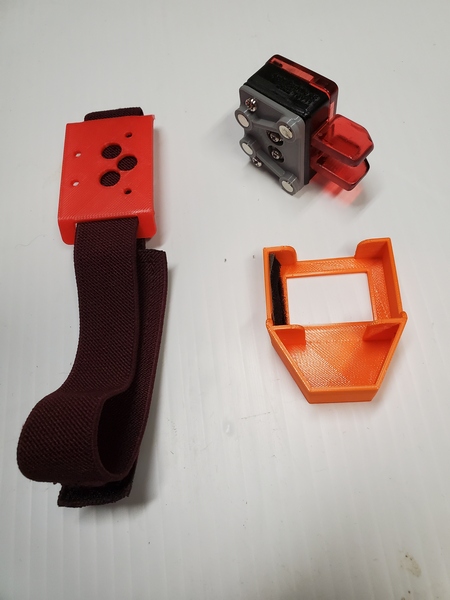
Overall Feel: Like the CWMouse paddles, the Ashi Paddle 45 uses microswitches for the contacts. Thus, the tension and throw are not adjustable. Of course, paddle spacing and tension are matters of personal preference. Being an Iambic Mode B user, timing is critical, so I prefer narrow spacing and light tension. The Ashi paddles’ spacing seems slightly wider than the CWMouse paddles, and the tension feels just a bit heavier.
When I first started using the Ashi paddles, I would occasionally get an extraneous “dit” when forming characters with a single squeeze, like the letter K. My guess is the microswitches are a little slow breaking contact after releasing the paddles. I have to send more deliberately and remove my fingers completely from the paddles after each character. Fortunately, it didn’t take long to get used to the feel, and I had no issues sending with the paddles. Of course, this is all based on my personal preferences, so your mileage may—and probably will—vary.
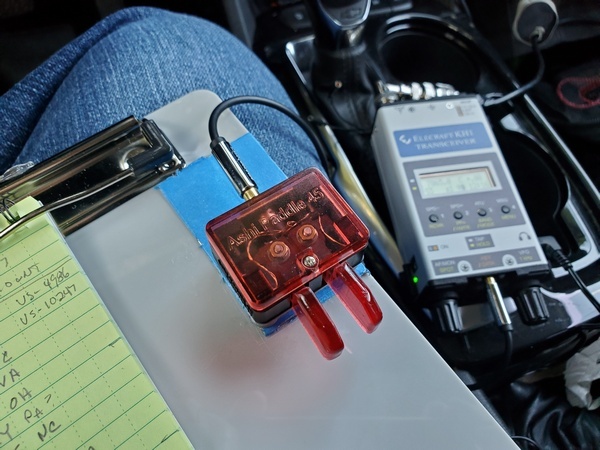
Mounting: My preferred method of sending is with the paddles attached magnetically to my little clipboard or a kneeboard for my KH1. So, naturally, I tried the magnetic mount first. Like my QU-21C paddles, the body of the key is small relative to the paddles. This makes magnetic mounting problematic. When I attach the paddles to a steel surface (like on my clipboard), they have a tendency to move side to side when keying. I have to use my hand to keep them steady. Not a huge thing, but I’d prefer they didn’t move at all. I have an idea in mind for an improved magnetic mount. If that works out, I’ll do a separate post on it.
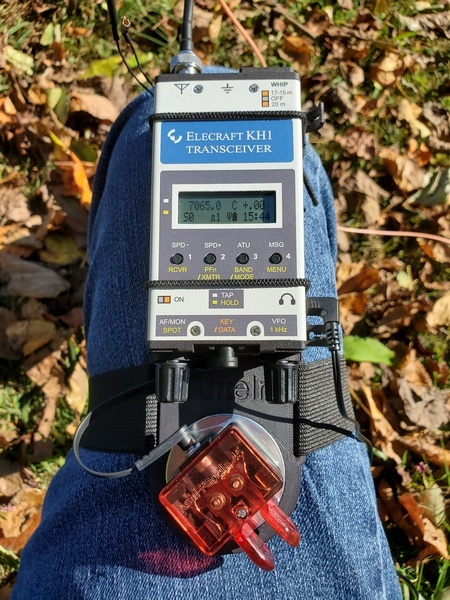
I haven’t used the leg mount in the field, but it worked great in the shack. That would probably be a great mounting option in some situations. The leg mount is cleverly designed so that you can angle the paddles to the left or right, if you like.
Overall, I like these paddles. Once I adapted to the feel, they worked reliably in the field. So, the Ashi paddles definitely replaced my quirky QU-21C paddles in my backpack.
72, Craig WB3GCK
 WB3GCK QRP Amateur Radio
My Ashi paddles started to stick really badly, seemingly just out of the blue. I took them apart and put a little light oil on the plastic to ease the pivot action (hopefully that won’t come back to bite me), and in the process tweaked the tightness of the screws holding it together to free them up a bit.
73, Roy WN3F
LikeLike
Good info, Roy. Thanks!
LikeLike