Covering More Bands with My 12-ft Whip

Back in 2017 I built my 19-foot wire vertical, which was my go-to portable antenna for about 4 or 5 years. The concept was simple: It functions as a base-loaded resonant vertical on 40M & 30M and as a random wire on 20M and up. The matching unit contains a tapped toroid for 40M & 30M and is fed through a built-in 1:1 choke. It occurred to me I could do something similar with the 12-foot telescopic whip and homebrew loading coil I’ve been using on my truck of late. 

My 12-foot whip setup is resonant on 40M through 17M. You’re probably thinking: “Why not just bypass the loading coil and adjust the length of the whip for 15M through 10M?” Well, being as lazy as I am, that would make band changes a little more involved than I want to deal with. I like having some “frequency agility,” and I’m not above using an ATU to achieve that.

To emulate the scheme I used for the 19-foot vertical, I just needed a choke at the input to my homebrew loading coil. (I could probably go without the choke, but I wanted to keep the coax from becoming part of the antenna.) So, I use the 12-foot whip as a base-loaded resonant vertical on 40M through 17M. For 15M through 10M, I would bypass the coil and use an ATU. 

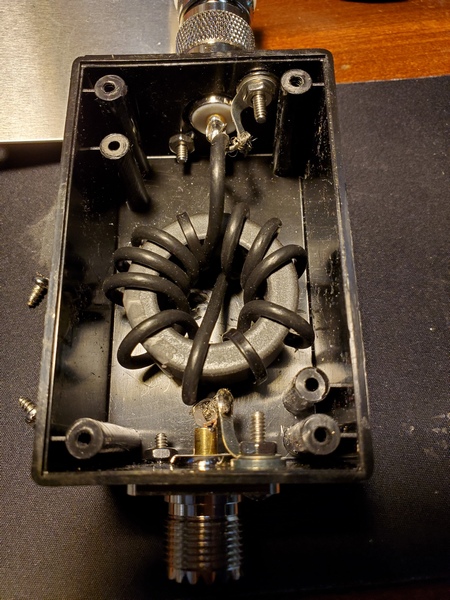
To test this out, I threw together a choke using parts I had on hand. I wound 10 turns of RG-174 on an FT-140-43 toroid. A Radio Shack project box I had in my stash of parts was the perfect size to house the toroid. (I bought it a decade or two ago, and it was still unopened in the original Radio Shack packaging.) Since I installed SO-239 connectors on each end, I had to use an adapter to connect the choke to the SO-239 on the antenna. To hold the coil in place, I wedged a piece of foam packing material between the lid and the core. The completed choke is functional, albeit a little cheesy-looking. 

The choke is 10 turns of RG-174 coax on an FT140-43 toroid.

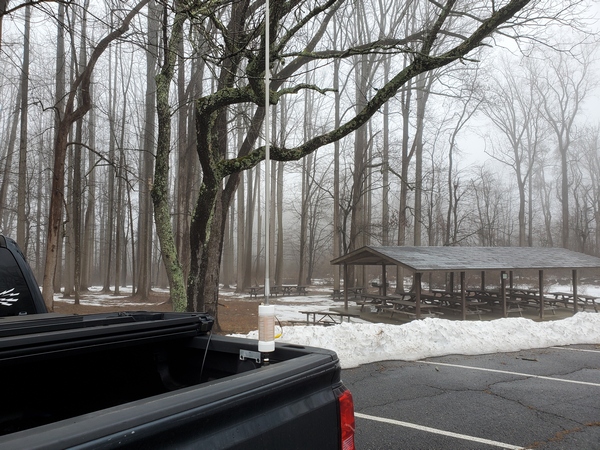
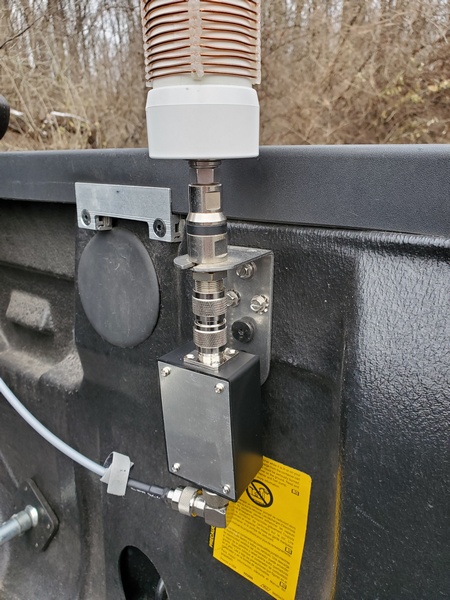
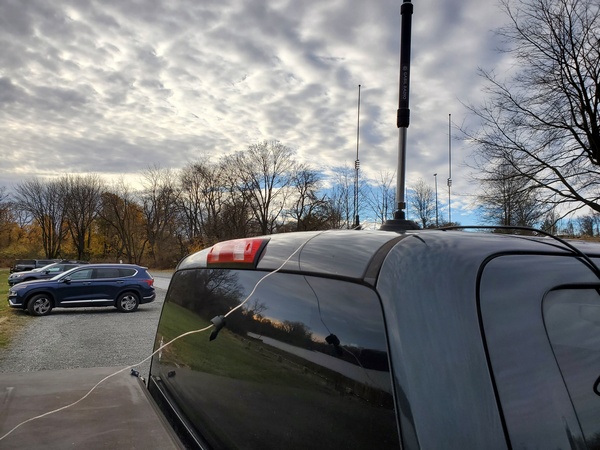
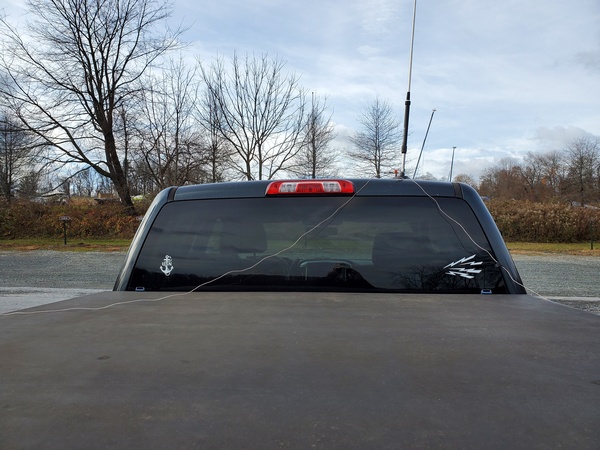
My first test using the 12-ft whip on the higher bands was a success. While activating Ridley Creek State Park (US-1414, KFF-1414), I used my KX3 (5 watts, CW) and installed the choke at the antenna feedpoint. On 40M through 17M, the loading coil functioned as it normally does. On 15M, 12M, and 10M, I bypassed the coil entirely and relied on the KX3’s internal ATU to load up the whip. 

The choke installed at the antenna's feedpoint
The choke installed at the antenna’s feedpoint

The KX3 easily found matches on all three bands, and my results on the air were encouraging. On 15M, I worked stations in Poland, Belgium, France, Ukraine, Germany (3), and the Slovak Republic. I made two stateside contacts on 12M. Up on 10M, I worked some more DX: Germany (2), Italy, and Czech Republic. One of the German contacts was park-to-park. 

I’ve used this arrangement on a few more activations since then, including Winter Field Day. My results have been consistently good.

I haven’t done any modeling, but the 12-foot whip seems to be a pretty good length for operating like this. It’s just a little longer than a ¼-wave on 15M and a little shy of ⅜-wave on 10M. On 12M, it’s somewhere between ¼ and ½-wave; so it isn’t resonant on any of the bands of interest. 

Although I was pleased with these initial results, I might do a little more tinkering with this setup. I’m toying with repackaging the choke to make it a little more weather resistant. I encountered some rain during the first activation using it. There was no damage to the choke at all, but I always have a tendency to over-engineer things—it keeps me occupied and out of trouble, I suppose. 

No scientific breakthrough here. Just a lazy guy “force feeding” a fixed length whip to squeeze a few more bands out of it. 

72, Craig WB3GCK

Hacking the QU-21 Mini Paddles

When I bought the QU-21C Mini Paddles a while back, I wasn’t crazy about the small square magnet attached to the base. It didn’t seem to hold very well. When subjected to vigorous keying, the paddles would sometimes move side-to-side. I came up with a quick and dirty hack that resolved the issue for me. 

A little backstory is in order. I’ve never been a big fan of “two-handed” keying; that is, holding the paddles in one hand while sending with the other. I modified a small clipboard by gluing two steel washers to it, such that they lined up with the two magnets in my Palm Mini paddles. The clipboard securely holds the paddles and gives me a nice writing surface for logging in the field. I’ve been using clipboards like this for about 10 years now.

In just a few minutes, I modified my QU-21C paddles to adapt them to my clipboards and make them more suitable for “single-handed” keying. The first order of business was to remove the square magnet from the bottom of the paddles. That was almost too easy. I wedged a knife blade between the base and the magnet, and the magnet popped right off. 

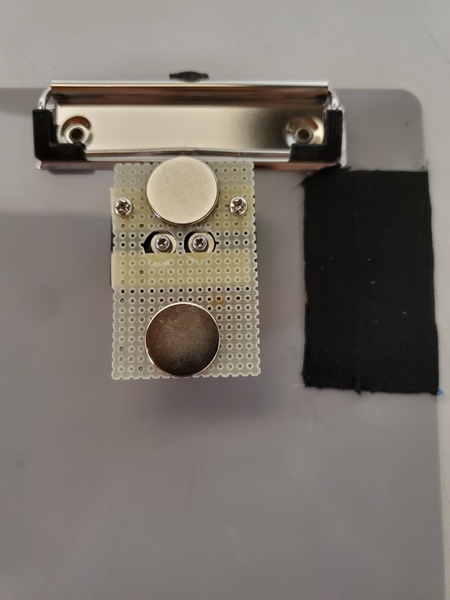
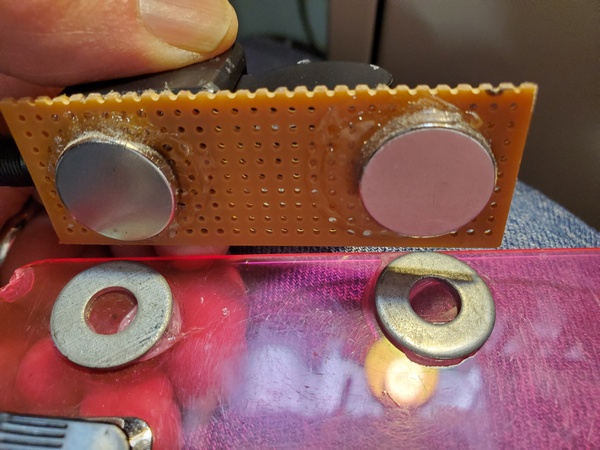
Magnets glued to the underside of the perf board to line up with the steel washers on my clipboard

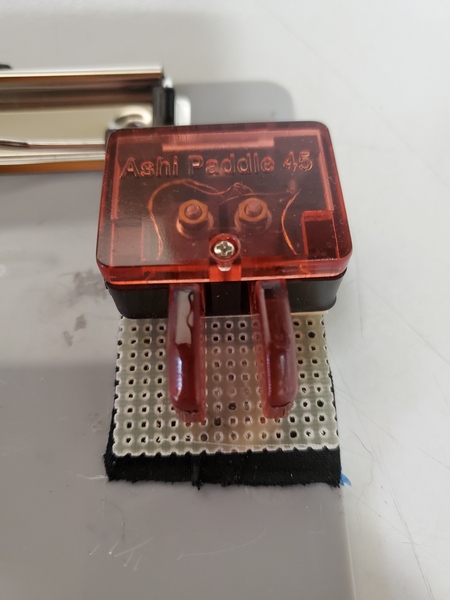
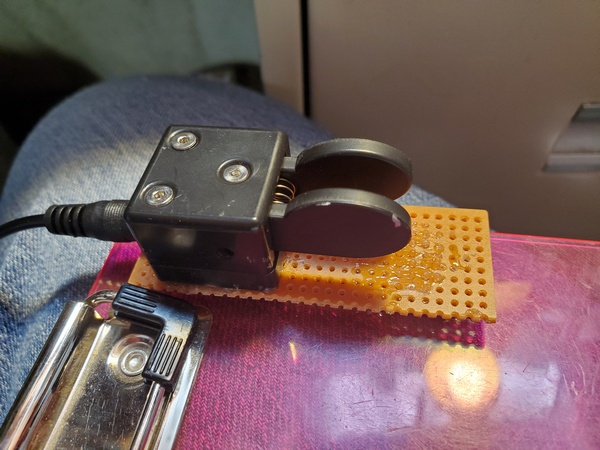
Next, I took some perf board from my junk box and cut off a 3.5 x 1 inch piece. I used some Goop® adhesive to attach two magnets on one side of the board. I placed them so they had the same spacing as the magnets on my Palm paddles. Then I glued the QU-21C paddles to the other side of the perf board. Except for the drying time for the adhesive, I completed the project in about 10 minutes. 

The QU-21 paddles glued to the perf board and ready for use

The magnets I used are really strong and probably overkill for this application. But, I had a bunch of them on hand, so I put them to use. 

Admittedly, this cheesy little hack doesn’t look like much. If I feel ambitious sometime, I might come up with something more elaborate. Maybe something like the base I made for my little MS2 straight key. For now, though, this will suffice.

72, Craig WB3GCK

Adding Radials to a Mag Mount

Reading through some blog posts recently, I came across an interesting idea from John AE5X. In the comments section of a recent post, John mentions adding a ground stud to a magnetic mount. The ground stud allows him to connect two ¼-wave radials (for 20M) for his MFJ-1979 telescopic vertical. So what follows is my implementation of John’s clever idea. 

On occasion, I’ve used my Gabil GRA-7350TC vertical with a small magnetic mount salvaged from an old 2M/440 antenna. I plan to use this configuration on my (far) better half’s car while visiting family over the holidays. The mag mount is only 3.5 inches in diameter, so I’m sure it’s not providing much of a ground connection. While the Gabil vertical is certainly usable with this mount, I’ve always felt that it needed more of a counterpoise on 40M and 30M to obtain a better match. I figured John’s idea might be the way to go. 

Since I needed to drill a hole from inside the mount, I had to remove the foil covering from the bottom of the mount. This magnetic mount is probably around 25 years old, so removing the foil wasn’t too difficult. Using my pocket knife, I was able to peel the foil off, while keeping it intact. 

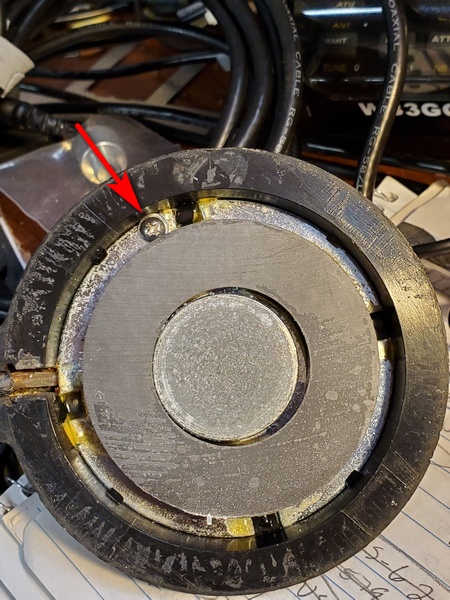
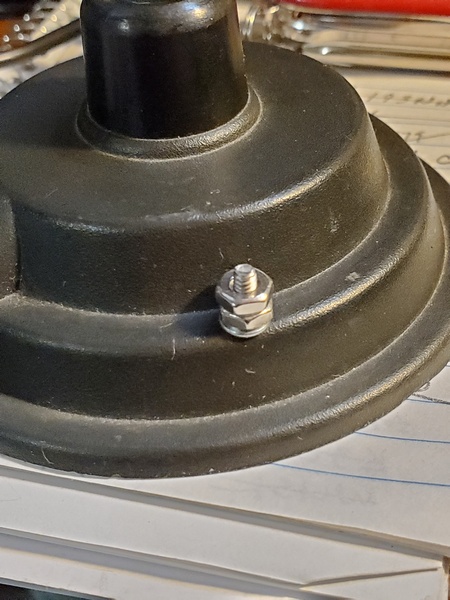
Next, I drilled a ⅛-inch hole through the ground plate and out through to the top of the mount. It was a tight squeeze, but I was able to get a 4-40 bolt and a star washer in there. On the outside of the mount, I used a nut and lock washer.

Interior view of the magnetic mount. It was a tight squeeze, but a 4-40 screw and star washer just fit in there.
Interior view of the magnetic mount. It was a tight squeeze, but a 4-40 screw and star washer just fits in there.

The final step was to re-apply the foil covering on the bottom of the mount. I used some rubber cement to reattach it. I don’t know how well the rubber cement will hold up over time, but it won’t be seeing heavy use. It seems fine so far. 

Exterior view of the old magnetic mount. I later removed the second nut from the screw I installed.

While I was at it, I replaced the PL-259 connector. The years had not been kind to the connector that was on there. 

I gave the modified mag mount a try during a recent activation at US-1380, KFF-1380. I used the GRA-7350TC and mag mount on the roof of my truck. With no counterpoise wire attached, the best match I could get on 40M was just a hair under 3:1. 

Next, I attached a 33-foot counterpoise wire to the mag mount. I ran the wire off the back of the truck and onto the ground. To avoid creating a trip hazard for others, I wrapped the wire around the side of the truck. In this configuration, I got the SWR down to about 1.2:1. Success!

The Gabil GRA-7350TC and magnetic mount with one 33-foot counterpoise attached. The wire dropped to the ground behind the truck and wrapped around the side.

Using the same counterpoise, the best I could do on 30M was a little under 2:1. I tried two 16.5-foot wires, but the result was about the same. No worries. An SWR of 2:1 is a piece of cake for the Elecraft T1 tuner. 

In this configuration, I had two 16.5-foot counterpoise wires attached.

I ran the entire activation on 40M and 30M with great results (40 contacts in less than an hour). In fact, it was the best I have done with the Gabil antenna and mag mount. Was it because of the counterpoise wire? Maybe. Regardless, my five-watt signal was getting out just fine with this thing.

Thanks again to John AE5X for the inspiration.

72, Craig WB3GCK

April Showers at Marsh Creek State Park

Lately, most weekends have been rainy around here. The forecast for tomorrow is much better than the rain today. Unfortunately, family obligations gave me no choice than to activate today.

I headed over to Marsh Creek State Park (US-1380, KFF-1380) early this morning, to avoid heavier rain later in the day. Despite the lousy weather, there were a lot of cars in the parking lot. 

A rainy morning on Marsh Creek Reservoir

The rig today was my usual Penntek TR-35 (5 watts, CW) and my 12-foot loaded whip. As is my usual practice, I started on 40M. The band predictions forecasted poor daytime conditions on 40M, but that wasn’t my experience. Although some of the signal reports I received were lower than usual, I logged my first 10 contacts in about 13 minutes. My first contact was in Georgia, so that’s not too bad for 40M. The 30M band also seemed to be in decent shape. 

When I moved up to 20M, I found some annoying broadband noise across the band. I’ve never encountered that here before, so I was wondering if there was a hybrid vehicle or something in the parking lot. I skipped 20M and moved up to 17M. The band was nearly devoid of activity, and 15 minutes of CQing failed to produce a single contact. While I was CQing, though, I passed the time by watching a large heron wading by. I went back to 40M to finish up.

This Heron was walking through the shallows looking for breakfast

My final tally was 32 contacts, three of which were park-to-park. I didn’t have any DX contacts this morning, but there were some highlights:

  • I had park-to-park contacts with KD8IE on two bands.
  • I worked my friend Frank N3FLL. I talked to Frank on a local repeater on my way to the park and gave him a heads-up. He found me on 40M.
  • I worked Al N3KAE on 40M. Al is the Regional Coordinator who uploads my WWFF logs for me. It was great to add him to the log.
Ready for the rain, with my patented coil protector (aka grocery store plastic bag) and some pipe insulation to seal the window opening

My setup withstood the rain pretty well this morning. I used a piece of pipe insulation on the passenger side window, where I fed the coax through. The fit could have been better, but it kept the rain out. Once again, I used a plastic bag to protect my homebrew coil. When I took the antenna down, I used a chamois cloth to dry the whip as I collapsed it. That worked pretty well. 

Pipe insulation sealing the window where the coax enters. The fit wasn't great, but it was good enough.
Pipe insulation sealing the window where the coax enters. The fit wasn’t great, but it was good enough.

Hopefully, we’ll have a rain-free weekend one of these days.

73, Craig WB3GCK

Palm Paddle Cable Repair

During a POTA activation a few days ago, I was in the middle of a QSO when my Palm Mini paddles started behaving erratically. I knew right where to look for the cause of the problem. 

The Palm Mini paddles have been my go-to paddles in the field for many years. Although the German manufacturer, Palm Radio, is no longer in business, they are still the only paddles I take along for portable work. They are compact, have a great feel, and work perfectly with the clipboard arrangement I use in the field. I loved the first set I bought and later acquired a second set. 

These great little paddles have one weakness: the cable connection. The three-pin connector is similar to standard header pins with a two-piece plastic backshell held together with a tiny screw. Once inserted into the paddles, there’s no locking mechanism to hold it in place. It’s definitely not the most rugged arrangement. After my first encounter with cable issues, I ordered a couple of replacement cables. Sadly, that’s no longer an option. 

During my most recent episode of cable problems, the connector backshell had fallen apart, leaving the tiny wires exposed. I grabbed a spare cable and was back in business in short order.

Fortunately, after some searching, I found the two backshell pieces on the floor of my truck. The screw that holds the backshell together goes into a threaded boss, which had broken. I encountered an identical failure on another cable a couple of years ago, so I knew how to deal with it. 

After I got home, I carefully checked the wire connections and confirmed that they were still intact. So this time, the fix was just to reassemble the backshell. Since I could no longer screw the two halves back together, I had to resort to drastic measures. I call this the “final fix.” Once implemented, it can’t be undone. 

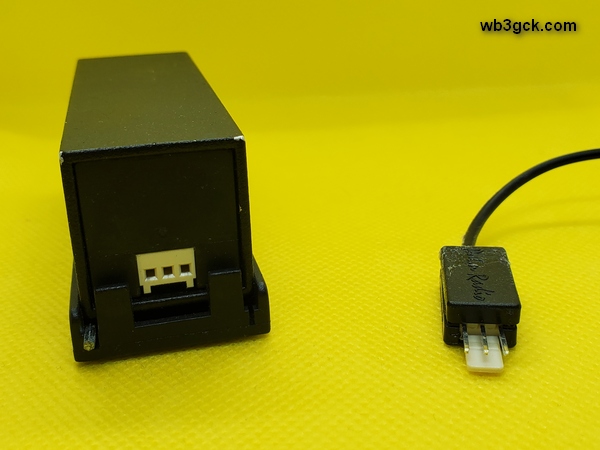
This photo shows the rear of the Palm Mini Paddles (left). On the right is the connector I repaired by gluing back together. In my haste to repair the cable, I neglected to take pictures of the inside of the connector.
This photo shows the rear of the Palm Mini Paddles (left). On the right is the connector I repaired by gluing it back together. In my haste to repair the cable, I neglected to take pictures of the inside of the connector.

I positioned the connector in the bottom half of the backshell and re-checked the connections. Then, I applied a dollop of Goop™ adhesive inside the backshell and put the top half on. The Goop™ filled the inside of the backshell, holding it all together and providing some additional strain relief for the tiny wires. After cleaning off the adhesive that squeezed out during assembly, I clamped the backshell overnight. The next morning, I gave it a test and confirmed that everything was still working. 

I’ve seen webpages describing ways of replacing the fragile connector with something more robust. I’m not quite ready to perform major surgery on my beloved Palm Mini paddles. Someday, I suppose, I’ll have no choice. 

72, Craig WB3GCK

Black Widow Pole Quick Fix

During my last POTA activation, the eyelet at the top of my trusty 20-foot Black Widow telescopic pole snapped off. This pole has served me well for over 25 years, so I can’t blame the pole. The Black Widow poles are still available from the manufacturer, so I could have just bought a new one. But hey, what fun would that be?

After staring blankly at the broken pole for a while, I rummaged through my stash of parts and came up with an easy fix. I found a small ring terminal that fit snugly over the top of the pole, so I just glued it on using some Loctite outdoor adhesive. In keeping with my usual practice, I added a small key ring (split ring) to the eyelet replacement. (For more on the rationale for the split ring, check out this post.)

My quick and dirty replacement for the broken eyelet on my Black Widow telescopic pole. I simply glued a ring terminal to the top section of the pole.

Well, that was easy enough. Hopefully, this silly little hack will squeeze 25 more years of use left in this old pole. It probably won’t, but a guy can dream, right?

72, Craig WB3GCK

Giving My Rig the Royal Treatment

Over the years I have accumulated a stash of the bags that Crown Royal whiskey comes in. I don’t drink much hard liquor myself, but I have a relative who enjoys a nip now and then. She knows I have a thing for bags and containers, so she passes them along to me. I graciously accept them, figuring someday I’ll find a good use for them. 

When I take my Penntek TR-35 on the road, I use a repurposed insulated lunch box to carry the radio, an Elecraft T1 tuner, along with a variety of accessories. Pending a better solution to protect the TR-35 from bouncing around, I wrap some bubble wrap around it before placing it in the box.  Decidedly low-tech, but effective.

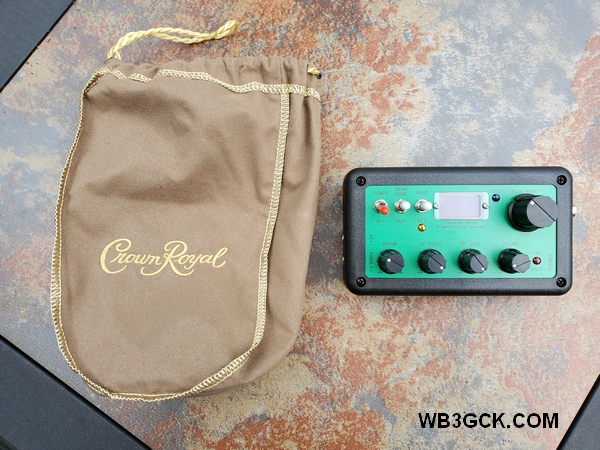
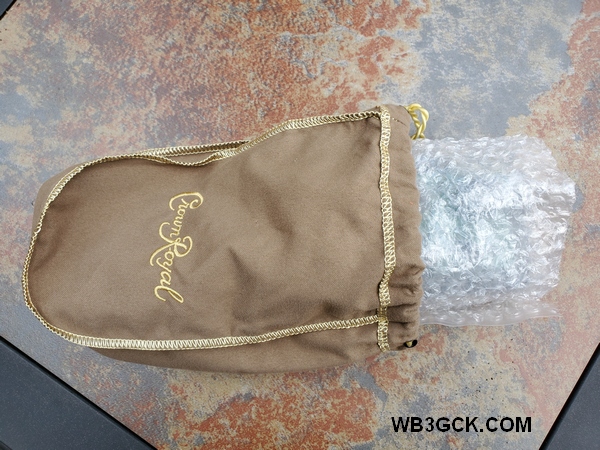
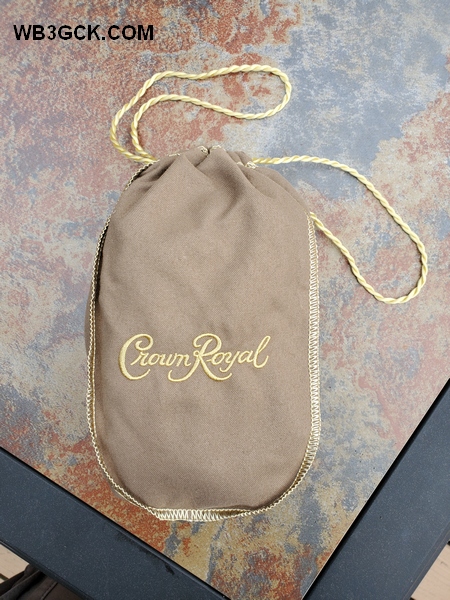
The Crown Royal bag, along with my TR-35 transceiver

The lunch box works great, but it’s a little bulky for my sling pack. So, for hiking, I usually pack the TR-35 loose in the pack, with a rubber band around the bubble wrap. 

The bubble-wrapped TR-35 going in the bag

I found that a Crown Royal bag provides a more elegant solution for packing the TR-35 (or other small QRP rig). I just wrap the bubble wrap around the radio and place it in the bag. There’s no longer a need for the rubber band. Plus, there’s enough room in the bag to accommodate the T1 tuner. 

The Crown Royal bag with my TR-35 tucked away inside

These bags don’t offer any real protection from the weather, but they look cool. My collection of bags includes a variety of colors, so I can change them to match my mood (just kidding—let’s not get carried away here).

So, there’s a crazy little hack for you to ponder. If you’re a Crown Royal drinker, save the bags. Your radio just might fit in there.

Bottoms up!

73, Craig WB3GCK

Managing LoTW Locations in TQSL

My (overly) fastidious approach to logging my ham radio contacts has been well-documented. Since I upload all of my contacts to the Logbook of the World (LoTW), I like to reflect my locations accurately in the TQSL software. When you do most of your operating while portable, that can add up to a lot of locations to deal with. I’ll show you my approach to dealing with locations in TQSL. 

How It Started

As best I can recall, I started using LoTW about six or seven years ago. I started creating new locations in TQSL for every place I operated away from home. So, there were lots of campgrounds that my (far) better half and I frequented, along with an assortment of parks and other places my radio has been to. Then, along came National Parks on the Air, followed by Parks on the Air. Before I knew it, I was scrolling through a long list of locations to find the one I wanted for an upload to LoTW.

One approach to paring down the list, I suppose, would be to go in and delete the one-off locations I’m not likely to visit again. That, however, conflicts with my inherent packrat nature. (That also explains the boxes of assorted leftover screws I have in the basement.) 

One thing I noticed is that many locations in my list shared the same attributes, e.g.: state, county, grid square, etc. For example, all the parks in northern Delaware I activated recently are all in the same county and grid square. (Fun fact: Delaware only has three counties.) Based on this observation, I came up with an approach to tame my locations list and make it easier to scan the list to find a particular location.

My Location Naming Convention

I ended up deleting most of my locations is TQSL and created some new ones using the following naming convention:

STATE_COUNTY_GRID

The STATE is just the standard two-character abbreviation. The GRID is the four-character grid square. Here are some examples from my locations list:

DE_NewCastle_FM29
MD_Cecil_FM29
PA_Chester_FN20
PA_Chester_FM29
PA_Delaware_FM29

TQSL automatically stores the locations alphabetically, so it’s easy to scroll through the list to find the location I’m looking for. I kept one or two of specifically named locations for frequently used places like “Home.”

My "Station Locations" pane in TQSL showing some of the locations I have stored
My “Station Locations” pane in TQSL showing some of the locations I have stored

While this works for my situation here in the States, operations in other countries would likely need some tailoring. I’ll cross that bridge when I get to it. Also, if you have certificates for more than one callsign, you’ll need to account for that.

Where Am I, Anyway?

To use this approach, I need to know what county and grid square I’m in. There are a couple of resources I use to do that. Before I get on the air from a portable location, I use these resources on my Android phone:

  • What County am I In. When I access this website from my cell phone, it shows the county I’m in, along with the zip code, address, and coordinates.
  • Easy QTH Locator. When you launch this app, it uses your phone’s location services to show your grid square, along with your coordinates and elevation.

Once I have determined the county and grid square I’m in, I jot this information down in my notebook or take screenshots from the apps on my phone.

These are the resources I use, but a web search will yield lots of similar tools you can use. I should also note that I have no financial interest in these apps.

Wrapping Up

This could very well be another case of over-thinking on my part. Regardless, I’ve been using this approach for a while now, and it has been working out for me. I’d be interested in hearing your method of managing portable locations for LoTW.

Oh, and before I forget… Remember to make regular backups of your TQSL locations, certificates, and preferences. Someday you’ll be glad you did.

73, Craig WB3GCK

Checklists for Portable Operations

Nothing can bring a portable radio outing to a screeching halt faster than forgetting to pack a critical item—an adapter, a cable, or heaven forbid, a radio. Been there, done that. My solution is a detailed checklist for such occasions.

At some point in my life, I became an obsessive checklist maker. Back when I was still working for a living, I relied heavily on checklists for my daily to-do list, things I needed to prepare for meetings, and the like. I naturally carried that habit over into my ham radio hobby.

Ham Radio Checklists

I keep a variety of checklists handy for different types of operating. A few of my standard checklists are:

  • Hiking
  • Bike-portable
  • Stationary-mobile operating from my truck
  • Operating from the camper

I also keep some checklists for some special events:

  • Field Day
  • Our annual summer vacation

For those one-off, ad hoc events, I sit down in advance to prepare a special checklist of things I need to take. 

I know all this sounds like a no-brainer, but I wasn’t blessed with the greatest of memories. When I try to take a shortcut around this process, the risk of forgetting an important item goes way up.

Preparing the Checklist

When developing a checklist, I do a mental walk-through of my setup in the field. I simply try to visualize setting up and make a detailed list of the things I’ll need. This method works for simple setups. For more complex set-ups, I sketch it out on paper and make my checklist from that.

An even better approach is to assemble the equipment at home. Then you can do a detailed inventory of your equipment to form your checklist.

When I prepare a checklist, I first list out the containers (backpack, box, bag, etc.) that I’ll be using to carry the equipment. Next, I list out everything that needs to be in those containers. I indent these items on the checklist below the container.

As items are packed in a container, I check them off. Then, as the containers are loaded into my truck, they are checked off. 

I also keep a list of things I need to do before the event. I call this my pre-flight checklist. I use this list to make sure batteries are charged, my truck’s GPS is programmed, and the like. 

The Mechanics

For years, I created my lists using a word processor. When it was time to pack, I just printed them out. That works fine, but I now use a paperless method.

I now use an application called Evernote to keep my checklists. My checklists are stored in the cloud, so I can access them from any of my computers and even my cellphone. I can check off items on my phone as I’m packing. After the event, I just go in and un-check the items, and the checklist is ready to go for the next outing.

A portion of a checklist as it looks in the Evernote app on my cellphone

You can get a basic Evernote account for free. There are paid options for folks (like me) who need additional capabilities and features.

Some “Pro Tips”

Here are a few lessons I’ve learned over the years:

  • Don’t be too quick to check off an item. If you check off an item before it is physically in the container or loaded into your vehicle, you’ll eventually run into problems. Don’t ask me how I know this; just trust me on this one.
  • After an event, take a few minutes to update your checklist, if needed. Was there something you wish you had brought or should have left at home? Some of my frequently-used checklists have been evolving for decades. 

Wrap-up

So there you have it. I know this is a somewhat mundane topic, but checklists have saved my bacon on several occasions. 

73, Craig WB3GCK

Amazing GOOP for Ham Radio

You have probably seen Amazing GOOP® in your local hardware store. This product with the funny-sounding name has been around for decades. I’ve been using it for ham radio applications for the past 25 years or so.

I recently did some extensive research on Amazing GOOP. (Full disclosure: OK. I lied. My “extensive research” merely consisted of a quick Google search and reading a Wikipedia article.) Back in 1972, a senior executive in the aerospace industry created a product called “Shoe GOO®.” Shoe GOO was intended to repair rubber-soled shoes. In fact, I first used it many years ago to repair a pair of rubber fishing waders. The original Shoe GOO is still produced by Eclectic Products. They also produce a wide variety of waterproof, flexible adhesives for a host of applications and environments. The Amazing GOOP® product line is what I’ve been using for ham radio applications.

Here are some of the uses I’ve found for it:

Sealing portable antenna connections. This was my original use for Amazing GOOP. After soldering the connections between the feedline and dipole elements, I seal them up with Amazing GOOP. I’ve never had any corrosion problems like you can run into with RTV.

This is the center connector of the doublet that I use for my "Up and Outer" antenna. I used Amazing GOOP to seal the soldered connections and help anchor the wires in place. This particular antenna was built about 15 years ago and is still holding up well.
This is the center connector of the doublet that I use for my “Up and Outer” antenna. I used Amazing GOOP to seal the soldered connections and help anchor the wires in place. This particular antenna was built about 15 years ago and is still holding up well.

Wire end loops. Instead of end insulators for my portable wire antennas, I just form small loops. I twist the wire to form a loop and use Amazing GOOP to hold the wire twists in place. (This works very well for my lightweight portable wire antennas but I would use end insulators for permanent antennas.)

End loop on one of my (many) wire antennas for portable use. I attach my throwing line directly to the loop, foregoing an insulator. With smaller diameter wire, I sometimes put some shrink wrap over the GOOP.

Powerpole® connectors. I’m a “belt and suspenders” kind of guy. So, I crimp and solder my Powerpole connectors. After I assemble and test them, I apply some Amazing GOOP where the wires enter the connector housing. This provides strain relief and makes them very rugged. I also place a dab of GOOP on both ends of the roll pin. This keeps them from popping out in the field.

Miniature audio connectors. I’m hard on the little 1/8″ audio plugs I use on my CW keys. So, after soldering and testing them, I put some GOOP on the connections before screwing on the plastic housing. Then, I put some GOOP on the wires where they enter the connector to add strain relief. I also apply GOOP to spade/ring lugs after they are crimped and soldered.

A 3.5mm plug and Anderson Powerpole connector after I have applied GOOP as a strain relief. Sure, they look a bit ugly but these connectors are pretty much bomb-proof. These items have seen heavy use in the field over the past 3 or 4 years.

My CW Clipboard. I used GOOP to attach the steel washers to the clipboards I use in the field. The washers are how I attach the magnetic bases of my portable paddles and straight key to the clipboard.

I used GOOP to attach the steel washers to the clipboards I use in the field. The washers are used to attach the magnet bases of my portable paddles and straight key.
I used GOOP to attach the steel washers to the clipboards I use in the field. The washers are used to attach the magnetic bases of my portable paddles and straight key.

My rainspout antenna. I use a liberal amount of GOOP to seal the connection to my trusty rainspout antenna. GOOP holds up well to the continuous exposure to the elements.

Hopefully, the pictures will clarify my descriptions.

If I can find it, I use one of the GOOP varieties intended for outdoor use for my rainspout and portable wire antennas. Right now, I’m using Amazing GOOP Max. Regular old household variety of Amazing GOOP is fine for most uses, though. For all applications, I like to let the GOOP cure overnight before use.

A few disclaimers are in order:

  • This stuff is permanent. Be sure whatever you’re using it on works before sealing it up with GOOP.
  • This stuff works for me, as described. I don’t know what you’re using it for or how you’re using it, so your results may vary.
  • I have absolutely no financial interests in this product. I’m just a satisfied consumer.

So, that’s it. I hope you found it useful.

73, Craig WB3GCK

Reference Links: