I’m almost too embarrassed to even post this, but it looks like I resolved my issues with my Elecraft T1 ATU. I think it might have been a monumental example of “cockpit error.”
This morning, a few hours after my last post went live, I sat down and went back through the T1 user manual. One line jumped out at me:
When bypassed, the T1 can still show SWR; activate TUNE mode, then key the transmitter.
Hmmm… So, that got me thinking. That would explain the behavior I have been seeing: indicating SWR while not trying to find a match.
I went downstairs to the shack to check the T1 again. When I entered the pushbutton sequence to enter the BYPASS mode, the T1 actually toggled into the “ATU Inline” mode. DOH! I connected the T1 up to my KX3 and rain gutter antenna, and it tuned up like a champ.
So, it looks like I might have accidentally put the T1 in BYPASS mode. Two errant presses of the push-buttons is all it would have taken. I’ll have to watch out for that, going forward.
Needless to say, I’m a happy boy again. Red-faced but happy.
Another busy weekend here in my neck of the woods. We had a family get-together in central Pennsylvania on Saturday, and I took part in a public service event with my local ARES-RACES group on Sunday. Despite everything going on, I squeezed in a short POTA/WWFF activation on Saturday morning before heading out of town.
I chose a spot in Valley Forge National Historical Park (US-0761, KFF-0761) that’s only a few miles from home. The parking lot serves as a trailhead for a popular trail, and it can be a busy place during the summer months. It wasn’t too bad today.
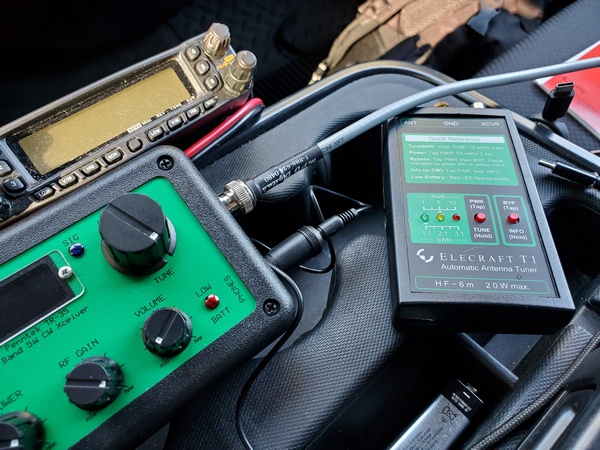
My original plan was to use some different gear and try out some antenna configurations. Being pressed for time, I went with my usual setup, which I knew—or thought—would work. That, of course, was my Penntek TR-35, Elecraft T1 tuner, and my 12-foot whip and homebrew loading coil combination. The SWR is a little higher on 40M and 30M, so I use the T1 to keep the rig happy.
I scanned the 40M band, and it was hopping. I planned to pick off some park-to-park QSOs before setting in on a frequency to call CQ. When I hit the T1, it didn’t even try to find a match, and the LEDs showed a 3:1 (or higher) SWR. I tried other bands, including ones I knew were close to 1:1, and the T1 wouldn’t budge.
I couldn’t remember the last time I changed the battery, so I put in a fresh one. No go. Next, I ran through the T1’s internal diagnostics. Nothing out of the ordinary there that I could see. On (very) rare occasions over its 11 years of service, the T1 would get fussy and refuse to match certain bands. Just running through the diagnostics seemed enough to clear up those issues—but not today.
I disconnected the T1 and went straight from the TR-35 to the antenna. The truck-mounted whip has very low SWR on 20M and 17M, so I confined my operation to those bands.
My ailing T1 after I disconnected it
Fortunately, 20M was in great shape for 0930 (local time), and I had a steady stream of hunters. I needed to leave at 1000 (local), and I had spent an inordinate amount of time playing around with the T1. However, my 30-minute activation netted me 26 contacts with two of them park-to-park. Most of the contacts were on 20M, but I had five on 17M before pulling the plug.
I drove back home, saddened that my trusty T1 was having issues. It has been so reliable over the years that I just took for granted that it would always work and match whatever antenna I was using.
Back at home, I did a couple of quick checks with different antennas, but no joy was to be had. I suspect a stuck relay, but I’m not really sure how to discern that from the internal diagnostics routine. I bought it assembled and tested, so I’ve never poked around inside. I’ll have to download the instructions for the kit version to see if that offers any insights.
When I get some time this week, I’ll pursue this further and decide how to proceed. If any T1 users out there have advice to offer, I’m all ears.
[Update: I resolved the issue with the T1. It appears to have been a case of “cockpit error.”Here’s what it was.]

 WB3GCK QRP Amateur Radio