Of Hotspots and Wi-Fi

I recently spent some time in Central Pennsylvania at my daughter’s house. Since I was going to be there a while, I brought along my Raspberry Pi hotspot. While I’m not really active in digital voice modes (or any voice modes, for that matter), there are a couple of DMR nets I like to check into each week. 

One issue I ran into in the past, is that my hotspot refuses to connect to their Wi-Fi network. Their Wi-Fi SSID has both an apostrophe and a space in it, so I’m guessing that’s the issue. I could have connected the hotspot directly to their router via an ethernet cable. Because of their router’s location, I would have had to move some furniture and put the hotspot in an awkward location. So, this time around I brought a little travel router to try another approach. 

Back when I was working, I had a TP-Link Nano router that I took on business trips. Typically, I would connect it to an Ethernet port in my hotel room to create a personal Wi-Fi network for my laptop and phone. A while back, I upgraded to the newer (and faster) TP-Link TL-WR802N travel router. I don’t travel nearly as much these days, so the new router hasn’t seen much use.

My little TP-Link travel router (right) and my beat up old hotspot. The paper taped onto the hotspot is to tone down its excessively bright LEDs.
My little TP-Link travel router (right) and my beat up old MMDVM hotspot. The paper taped onto the hotspot is to tone down its excessively bright LEDs.

I brought the travel router along on this trip to create a wireless bridge from the house’s Wi-Fi to my personal Wi-Fi. The router’s Wi-Fi network has an SSID that my hotspot likes. I haven’t used that mode much, so I had to resort to the user manual to refresh my memory on how to set this thing up.

Actually, it was pretty easy to set up. It was simply a matter of connecting my laptop to travel travel router’s Wi-Fi to access the admin functions. From there, I set it up in the “Hotspot Router” mode. Then, I scanned to find the house’s Wi-Fi network and logged into it.

Testing the internet connectivity with my laptop, the speed looked good. I had previously added my travel router’s SSID and password to the hotspot, so soon after powering up I was hearing the sounds of DMR coming from my HT. This configuration worked great, and I successfully checked into a few nets during the week. 

The next time I go out there to visit, I’ll just need to power up the router and the hotspot, and everything should work. (Knock on wood)

No ground-breaking technological advances here. I just love when a plan comes together. 

73, Craig WB3GCK

[Disclaimer: I have no monetary interest in this product, and there are no affiliate links in this post. I’m just a satisfied owner.]
My Hotspot is Back From the Dead

While trying mobile DMR last month, my (relatively) cheap hotspot experienced an untimely death. I set the hotspot aside as a future troubleshooting project.

While the Pi-Zero board appeared to be working, the MMDVM board was dead as a doornail. The OLED display was blank, and the RF side of the hotspot was non-responsive. It also wasn’t interacting with the Internet at all.

The other day, I came across a posting on a Facebook MMDVM page that shed some light on my problem. Some users reported shorts between the internal boards and the aluminum case. This tidbit of information prompted some further investigation.

I removed the top of the case, reinstalled the antenna, and applied power. To my surprise, the hotspot booted up and came back to life.
I let it run for a while without the case to verify that all was well. It was.

I noticed a solder connection that extended a little beyond the edge of the MMDVM board. It appeared to be a power connection, so I suspect that might have been what shorted. I also noticed that a single screw and the header pins are all that secure the top board. I’m guessing the board shifted a small amount while mobile causing the short.

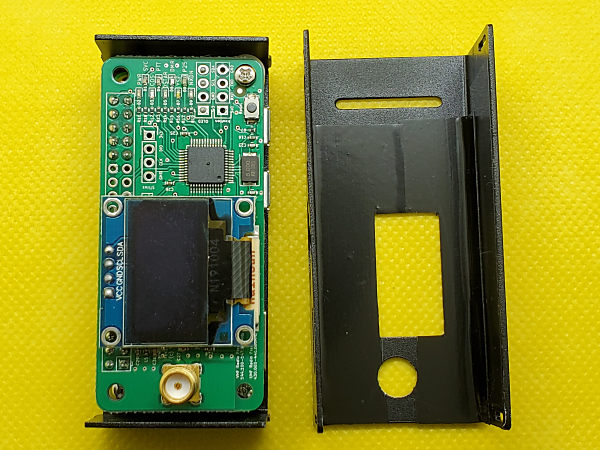
My disassembled hotspot. If you look closely, you can see the electrical tape I added inside the top cover.

To remedy this, I applied electrical tape inside the top cover of the hotspot. Not being 100 percent certain where the problem was, I covered everything except the vent openings. I used a razor blade to trim the tape around the OLED display and antenna jack openings. I also took a file to the little solder blob I had noticed. (I exercised extreme caution in doing this since I’m sometimes prone to creating new problems.)

I reassembled the case and powered it up. Voila! It still worked. Hopefully, this fix will avoid any reoccurrences and make it withstand the vibrations of mobile use.

Although you’re far more likely to find me on CW on the HF bands, I do monitor Brandmeister TG-3142 (Pennsylvania State-wide) on DMR. And, on occasion, I listen to D-Star REF20A.

73, Craig WB3GCK

One of Those Days

Did you ever have one of those days where just about everything seems to go wrong? Yesterday was one of those days for me.

I went out to my daughter’s property yesterday to do a little portable operating. The temperature was in the low 30s (F), with a wind chill temperature down in the low 20s. Earlier in the day, my daughter cautioned me about the strong winds on the hill, my usual operating location. Despite all that, I headed up there anyway. I figured I’d hunker down in the truck and be fine.

As I was putting my vertical on the back of the truck, a strong gust of wind had me starting to regret my decision. I pressed on and got everything set up. The wind was whipping the antenna around, but everything was working fine. So far, so good. 

I started on 40M and quickly put a Canadian station in the log. I moved up to 30M and soon worked SKCC Straight Key Month stations, K3Y/5 and K3Y/9.

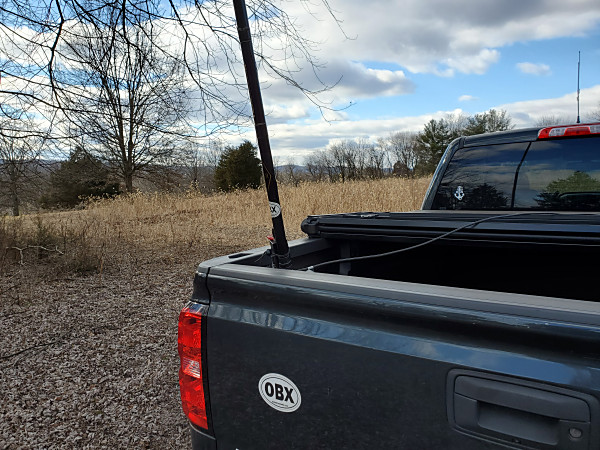
About that time, I looked in the rear-view mirror and saw my antenna leaning over. The movement from the wind got the top of my antenna stuck in a tree branch. I removed the 20-ft pole and laid it on the ground. I pulled my truck forward a few feet and re-installed the antenna.

My 20-foot Black Widow pole blowing in the wind. It eventually got stuck in a tree branch.

I got back in the truck and fired up the KX3. I spent the next half hour or so trying to reach stations but not being heard. When I went out to the antenna to change bands, I found that I had neglected to connect the ground. Doh!

After correcting my oversight, I had much better luck on 20M. I worked N4CD who was activating a park in Texas. I finished up with an SKCC QSO with a station on the West Coast in Washington. 

I was mentally celebrating my coast-to-coast contact until I looked in the mirror and saw my antenna wire flapping in the breeze. Sometime during that last QSO, two sections of my pole had collapsed. That was enough for me; it was time to pack up.

But, as they say on TV, there’s more… 

I’ve been using DMR since last year, and I wanted to try going mobile. So, I brought my AnyTone AT-D878UV HT and my hotspot. I had the hotspot in the back seat, using one of the truck’s USB ports and built-in Wi-Fi hotspot. On the drive out, it worked fine. When I started the engine to head home, I noticed that the hotspot’s display was blank. It was connected to the Wi-Fi but not sending or receiving anything. 

When I plugged it in at home, I heard a brief snap. So, I think something in there got fried. I suspect there might have been a voltage surge or something when I started the truck. Doh! I guess I’ll have to start learning about Raspberry Pi and try to rebuild it one of these days. 

Looking back, I guess it wasn’t a total disaster. Despite Mother Nature and my self-inflicted issues, I still managed to put a few decent contacts in the log. I’ve had worse days, I suppose.

Here’s to better days in the future!

73, Craig WB3GCK