Back to the Field Again

Boy, it sure has been a while since I’ve done any portable operating.  Other projects and interests seemed to have overtaken ham radio for the past few months.  With temperatures near 70F today, I couldn’t resist the opportunity to shake off my cabin fever.

My XYL was planning to drive out to our daughter’s house to help her out with a household project.  I decided to tag along and do some operating from my daughter’s property.  I purchased a new truck about a month ago and had yet to do any QRP operating from it.  Today looked like a great opportunity to do a little testing.

I parked the truck in a remote corner of my daughter’s property, next to her neighbor’s corn field.  I set up a 29.5-foot vertical using my bike rack mount on the rear of my truck.  I fed it through a 9:1 unun and ran a 25-foot coax cable into the passenger side window of the cab.  So far so good.
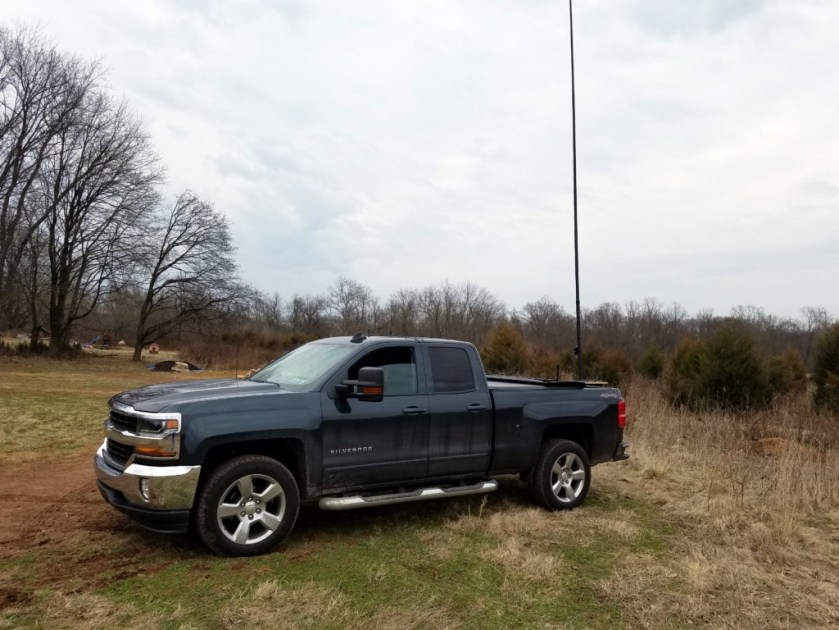
My new truck's first QRP-portable outing.
My new truck’s first QRP-portable outing.

Given that this truck is larger than my last one and the configuration of the center console is much different, I had to do some finagling to place my KX3.  I used a small Rubbermaid® container on the passenger seat and placed the KX3 on top of it.  Due to the distance involved, I had to place my clipboard and paddles on the console in order for the cable to reach the rig.  (Unfortunately, I forgot to take a picture of the setup.)  It worked OK but I need to figure out a more comfortable arrangement.  I have some ideas that I’ll be exploring.
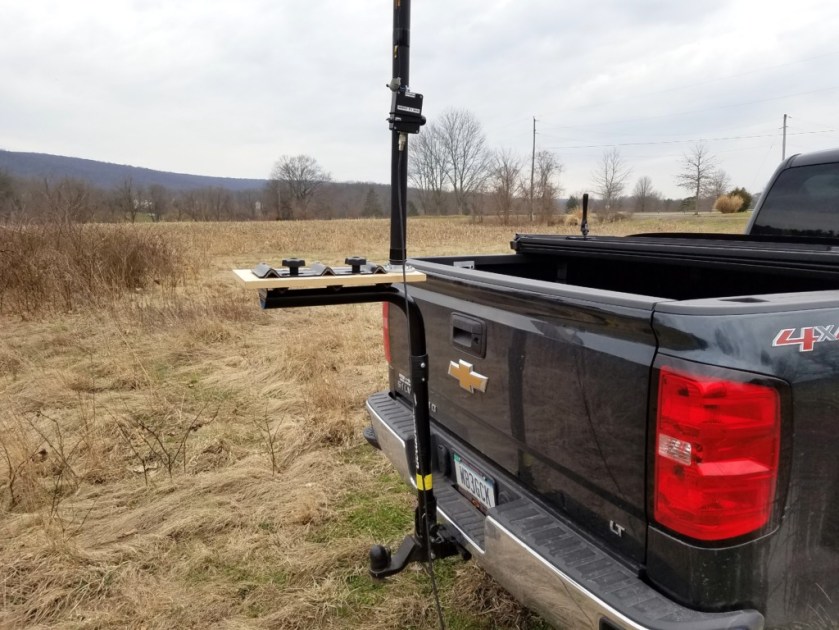
Bike Rack Antenna Mount. A 9:1 unun is attached to the Jackite pole with a bungee cord.

My goal for today was to make contacts on 40, 30 and 20 meters.  I started out calling CQ on 40 meters and NN4NC in North Carolina came back with a very strong signal.  During our QSO, Mac reduced his power to match my 5 watts and he continued to boom into southeastern Pennsylvania.  I then moved up to 30 meters and had a short exchange with W1TEF in South Carolina.

When I moved to 20 meters, I heard WU5M calling CQ near the QRP watering hole.  I gave Bryan a call and we had a two-way QRP QSO, despite some fading on the band.  It started to rain so I signed with Bryan and quickly took down the antenna.  I was parked in an area that tends to get very muddy when it rains.

So, everything worked fine with the new truck but I do need to work out some better ergonomics.  It felt good to get back out in the field again, even if only for an hour or so.

72, Craig WB3GCK
Logging: Keeping Track of it All

Going all the way back to my Novice days in the mid-70s, I’ve always been a bit anal…  er… diligent, when it comes to logging contacts.  Years ago I started using logging software and that diligence persists.  Over the years, I’ve evolved to a logging process that I’m sure some would find overly complex.  It’s actually not that bad and it works well for me.

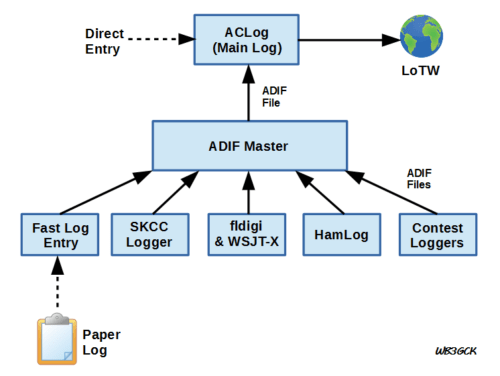
I use a variety of methods to capture QSO information.  Eventually, everything ends up in one central log.  From there, all QSOs are uploaded to Logbook of the World (LoTW).  The diagram below shows how everything ties together.

Overview of my logging process. In the end, all contacts end up in the Main Log.

Here are the main components of my logging system:

ACLog.  I use this software by N3FJP for my main log.  All QSOs, no matter how they are made or logged wind up in here.  Because most of my HF operating is done while portable, I added a few custom fields to keep track of where I was (MY_QTH), what rig I was using (MY_RIG) and what power I was running (TX_PWR).  Everything in my main log gets uploaded to LoTW.  ACLog makes it very easy to do that.  For casual operating at home, I enter the contacts directly into ACLog.  Same goes for paper logs from portable operations with just a few contacts.  For larger batches of contacts, I might resort to other methods.

ADIF Master.  I use this great piece of freeware a lot.  It allows me to take an ADIF file and easily add in the custom fields I keep track of and do a quick bulk edit to populate the fields for all QSO records in the file.

Fast Log Entry (FLE).  I wrote about this software in an earlier post.  This came in handy last year for National Parks on the Air activations.  When I used paper logs for activations, FLE gave me a fast way to enter the QSO data and generate an ADIF file.

SKCC Logger.  I use AC2C’s SKCC Logger software to log all of my Straight Key Century Club contacts.  This software does automatic lookups from the SKCC member database when you enter a callsign.  It also helps keep track of award levels and generates award applications.  From SKCC Logger, I generate an ADIF file for further editing and importing into ACLog.

fldigi.  Every now and then I get on a digital mode kick.  Initially, I use fldigi’s internal log and export an ADIF file.  I haven’t worked JT65 or JT9 in a while but, when I do, I export an ADIF file from the WSJT-X software.

HamLog.  When I’m away camping for a few days, I use HamLog on Android cellphone to log my contacts.  If I have a cell connection, I can do QRZ.com lookups while logging a contact.  I export an ADIF file when I get home.  After, editing the ADIF and successfully importing it into ACLog, I go back to HamLog and clear out the log file so I’m ready for the next trip.

Contest Loggers.  When I use a specialized contest logging program for a contest… Well, you know the drill.  I export an ADIF file, edit in my custom fields, and ingest it into ACLog.

So, that’s it in a nutshell.  It probably sounds complicated but it has all become second nature to me.  I’m not suggesting that you do the same but, perhaps, some of the utilities and techniques will be useful to you.

I hope to see you somewhere down the log!

72, Craig WB3GCK